
A headless CMS is having a moment for a reason. Most teams are no longer publishing content to “just a website” — they’re feeding multiple sites, apps, landing pages, emails, digital screens, and new interfaces that keep popping up. Headless makes that easier because it treats content as something you store once and deliver anywhere.
If you’re feeling boxed in by templates, slow releases, or content that has to be copied and pasted across channels, this guide is for you. We’ll cover what headless CMS is, why it’s different, and how to decide whether switching now actually makes sense.
Thinking about going headless but not sure where to start?
Request a headless CMS readiness review and we’ll help you map the right approach for your team
What is a Headless CMS?
Headless CMS comes down to one core idea: the “head” or how content looks on the frontend is separated from the backend where content is created, stored, and managed. Instead of the CMS also being responsible for presentation, content is delivered to whatever frontend you want via APIs.
In other words, a headless content management system is built to deliver content beyond a single website. Your team manages content centrally, and developers use APIs to pull that content into websites, apps, and other channels.
How a Headless Content Management System Works in Practice
Let’s break headless into layers, and it’s a helpful way to picture it. You have the content layer (where editors create structured content), the API layer (how systems fetch that content), and the presentation layer (the website/app/interface that displays it).
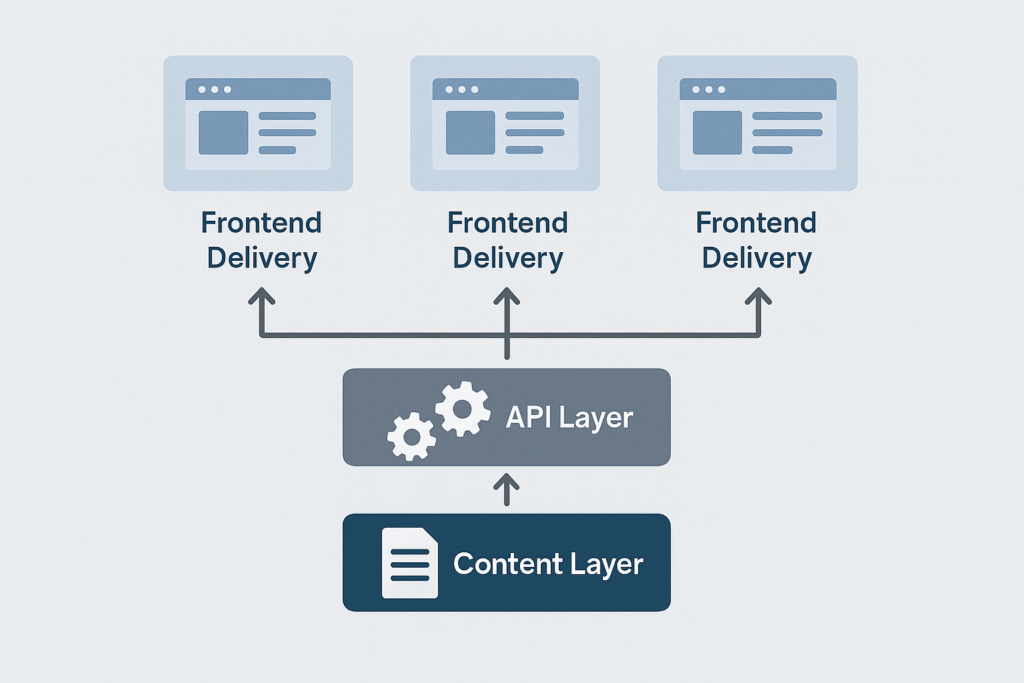
That structure is what gives Headless its flexibility. Your CMS doesn’t dictate what the frontend must be – developers can choose what makes sense for performance, design, and product needs, while editors still get a dedicated authoring environment.
Why Using a Headless CMS is Worth Considering Now
Headless CMS often comes down to speed and reuse. When content is structured and centralised, you can update copy or assets once and push the change everywhere that content appears, instead of duplicating work across pages and platforms. Teams scaling across platforms also use an email verification API to keep contact data accurate.
This is where the COPE idea (or the “Create Once, Publish Everywhere”) gets brought up a lot. The principle is essentially structured content: create and manage content in one place so it can be reused across different outputs.
It also reduces bottlenecks. Headless frameworks are designed so that content and development teams can work in parallel, rather than constantly waiting for content changes to be processed in a developer queue.
Security and scalability get mentioned for a reason too. With headless, the CMS is separated from the public-facing presentation layer, which can reduce the attack surface compared with tightly coupled setups.
The Difference Between Headless, Traditional, and Decoupled
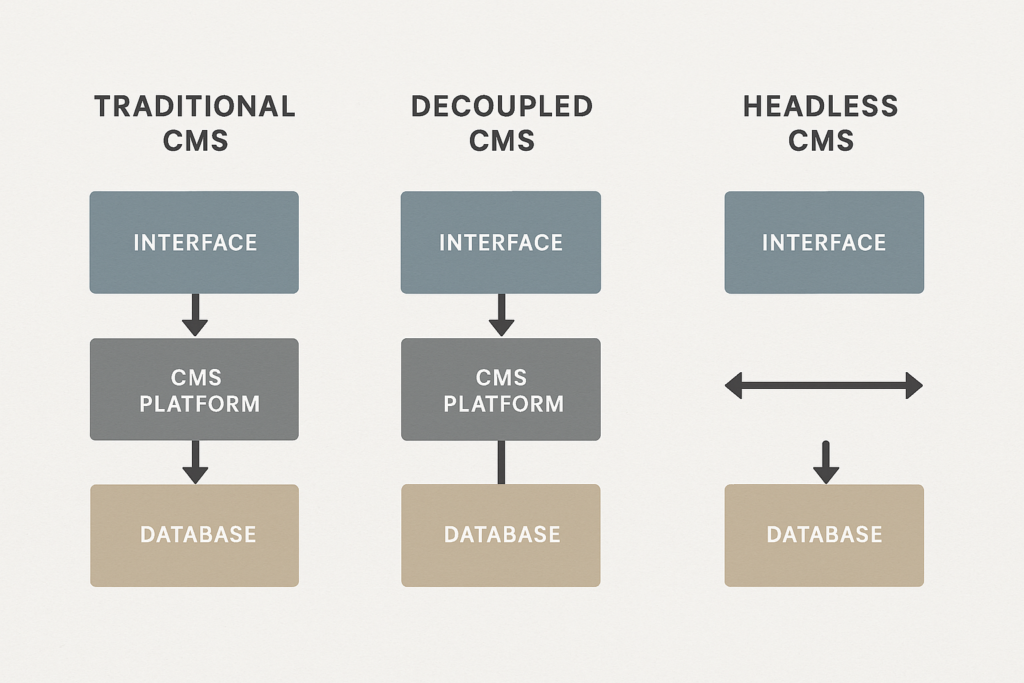
Traditional CMS platforms were built to store and present content for websites, often with themes and templates controlling frontend output. That’s simple and fast for many sites, but it can make reuse across multiple channels harder, because content and presentation are closely tied together.
Headless flips that. Once content is created, it’s delivered to the frontend via APIs, so you can publish to many channels and redesign the frontend without rebuilding your content operation from scratch.
You’ll also run into “decoupled CMS”. The simplest way to remember it is: decoupled systems separate the backend and frontend, but they may still include an optional “head” or default presentation layer; headless systems do not include a presentation layer at all.
Which Headless CMS Should You Choose?
Which headless CMS is “best” depends on what you need to ship, and how your team works. A good way to decide is to start with the content and workflows you need, then shortlist platforms that can support those without locking you into awkward workarounds.
When you’re comparing options, ask questions like:
- Can you model the content structures you actually need?
- Are hosting and maintenance handled?
- Is it privacy-compliant?
- Does real-time collaboration matter for your workflow?
- Are you locked into HTML for rich text, how do assets work?
- Can you scale without surprising pricing jumps?
If you’re building a shortlist, it’s also worth knowing you’re not limited to three “famous” platforms. You may check out headlessCMS.org for a broader list of headless content management systems, which can be a useful starting point for research.
Do You Really Need to Switch to Headless CMS Right Now?
Headless is not automatically the right answer for every website. Even headless CMS educators point out that you generally need some technical resource available, because you’re effectively taking responsibility for how content is rendered and delivered on the frontend.
A sensible “switch now” trigger is when your business is starting to feel constrained: you’re adding channels, launching new digital products, scaling localisation, or you’ve outgrown rigid page templates and release cycles. That’s exactly the type of modern, multi-channel pressure headless CMSs were designed to handle.
Learn How to Migrate to a Headless CMS Without Breaking Everything
A clean migration starts with content modelling. Before you move anything, define content types and reusable fields such as title, body, images, metadata, localisation, and components so your content can be recombined across channels, not just recreated in a new tool.
From there, build your frontend delivery in a way that’s solid for search and performance. If your frontend is JavaScript-heavy, remember that search engines process JavaScript content through crawling, rendering, and indexing, and JavaScript issues can affect discoverability.
If you’re worried about SEO, don’t default to “dynamic rendering” as your primary plan. Google’s guidance describes it as a workaround and explicitly recommends server-side rendering, static rendering, or hydration instead.
Here’s a Practical Launch Checklist You Can Use When Switching to Headless CMS
Make sure you have:
- Structured content models.
- Preview and publishing workflows.
- Redirects and URL mapping if you’re moving pages.
- Metadata and schema support in your frontend templates.
- A rendering approach that’s dependable for crawlers.
Ready to Move from “Headless Curiosity” to a Real Plan?
Let’s scope your migration, front-end build, and SEO requirements so you can switch with confidence.