
In today’s crowded digital landscape, having great content is no longer enough. If search engines cannot understand your pages, your content may never reach the right audience. This is where schema markup comes in. By adding structured data to your website, you help search engines interpret your content accurately, making it more likely to appear in enhanced search results.
But what exactly is schema markup, and how can it benefit your site? In this guide, we’ll break down the fundamentals, explain why it matters, and show you how to implement it effectively.
What is Schema Markup?
Schema markup, also known as structured data, is a type of code added to your website that helps search engines understand the meaning behind your content. While humans can easily recognise a recipe, a product listing, or an event, search engines rely on this to identify these elements accurately.
Think of this as a pair of glasses for search engines – it clarifies your content and ensures nothing gets lost in translation. With the right markup, your pages can appear as rich results in search engines, displaying extra details like ratings, cooking times, event dates, or product prices.For example, a recipe page with schema markup may show not only the title and URL but also star ratings, prep time, and calories right in Google’s search results. This not only improves visibility but also encourages users to click through to your website.
| In short, schema markup transforms your content from something search engines simply index to something they can interpret and showcase more effectively. |
Why Schema Markup Matters for SEO
Implementing schema markup is more than just a technical exercise — it directly impacts how your content performs in search results. When search engines can clearly understand your content, they are more likely to display it in rich results, which stand out from standard listings.
Rich results often include images, ratings, prices, event details, or FAQs, making your page more attractive and clickable. This can lead to:
- Higher click-through rates (CTR): Users are drawn to pages with additional visible information.
- Better indexing: Search engines can categorise and display your content more accurately.
- Increased visibility in voice search: Devices like Google Home and Alexa often rely on structured data to pull precise answers.
While schema markup alone won’t guarantee a #1 ranking, it complements quality content and domain authority, making your pages more competitive in search results. Simply put, structured data helps search engines help your users.
Ready to boost your site’s SEO performance? Explore professional Search Engine Optimisation services to implement schemas effectively and improve your visibility.
Types of Schema Markup
Schema markup comes in many types, each designed to describe different kinds of content. Implementing the right types ensures that search engines can fully understand your pages and display them effectively in rich results. Here’s a more detailed look:
WebPage
The WebPage schema tells search engines that a page is a standard webpage and provides basic information about it. This is a foundational markup, often used site-wide, and can be combined with other schemas like BreadcrumbList to clarify page hierarchy.
Example: Your homepage, an “About Us” page, or a service page can all use WebPage markup to establish their role on the website.
BreadcrumbList
BreadcrumbList schema adds a trail of links showing the page’s location within your website’s structure. This helps both users and search engines understand the site hierarchy.
Example: For an eCommerce site, a product page might show Home > Category > Subcategory > Product in the breadcrumbs. When marked up, these breadcrumbs can appear in Google’s search results.
Organisation
The Organisation schema provides structured information about your business, including your name, logo, contact details, and social media profiles. This helps Google display enhanced results like Knowledge Panels.
Example: Adding Organisation schema ensures your business appears correctly in search results and Google Maps, improving credibility and local visibility.
Article & BlogPosting
Article and BlogPosting schema enhance news or blog content by specifying details like the headline, author, date published, and images. They are essential for publishers who want to appear in rich search features.
Example: A blog post about SEO tips could use BlogPosting markup to display the title, author, publish date, and even featured images in search results.
Product & Offer
These schemas are vital for eCommerce. Product schema provides details like product name, description, SKU, and brand. Offer schema adds pricing, availability, and sales info. When combined, they often display as rich product snippets with star ratings, price, and stock status.
Example: A product page for headphones could show price, availability, and reviews directly in Google search results.
Review & Rating
Review schema lets search engines understand user ratings and reviews. Pages with reviews can appear in rich snippets with stars, boosting click-through rates.
Example: A restaurant page could display star ratings from multiple reviewers in search results, helping it stand out from competitors.
Event
Event schema highlights upcoming events such as concerts, workshops, or conferences. It can include date, location, ticket price, and organiser information.
Example: A concert venue could have structured data for each event, making it more likely to show in event-specific rich results on Google.
FAQPage & QAPage
FAQPage schema allows you to mark up a list of questions and answers, making them eligible for rich results with expandable sections. QAPage schema works for community Q&A or forums.
Example: A product FAQ page could display the top questions directly in Google’s search results, giving users immediate answers.
LocalBusiness & Place
For local businesses, LocalBusiness schema is essential. It provides business type, address, phone, opening hours, and geo-coordinates. Place is broader and can describe locations like parks, landmarks, or museums.
Example: A café can use LocalBusiness markup to appear in Google’s local pack with opening hours and location.
Creative Works
This includes Book, Movie, MusicRecording, Recipe, and TVSeries. These schemas are for media content, allowing rich search features like review stars, cooking time, or streaming availability.
Example: A recipe page with Recipe schema could display prep time, calories, ingredients, and user reviews directly in Google search results.
By using multiple schema types strategically, you increase the chances of your content appearing in various rich results, enhancing visibility, CTR, and user engagement.
How to Add Schema Markup
Adding schema markup to your website doesn’t have to be intimidating. While it involves a bit of code, there are simple ways to implement it and make your pages eligible for rich results.
1. Choose the Right Schema Type
Before adding a schema, identify the type that fits your content. For example:
- Blog posts → BlogPosting
- Product pages → Product and Offer
- Local businesses → LocalBusiness
- FAQs → FAQPage
Start with the schema that will give the most value in search results for your users.
2. Use JSON-LD Format
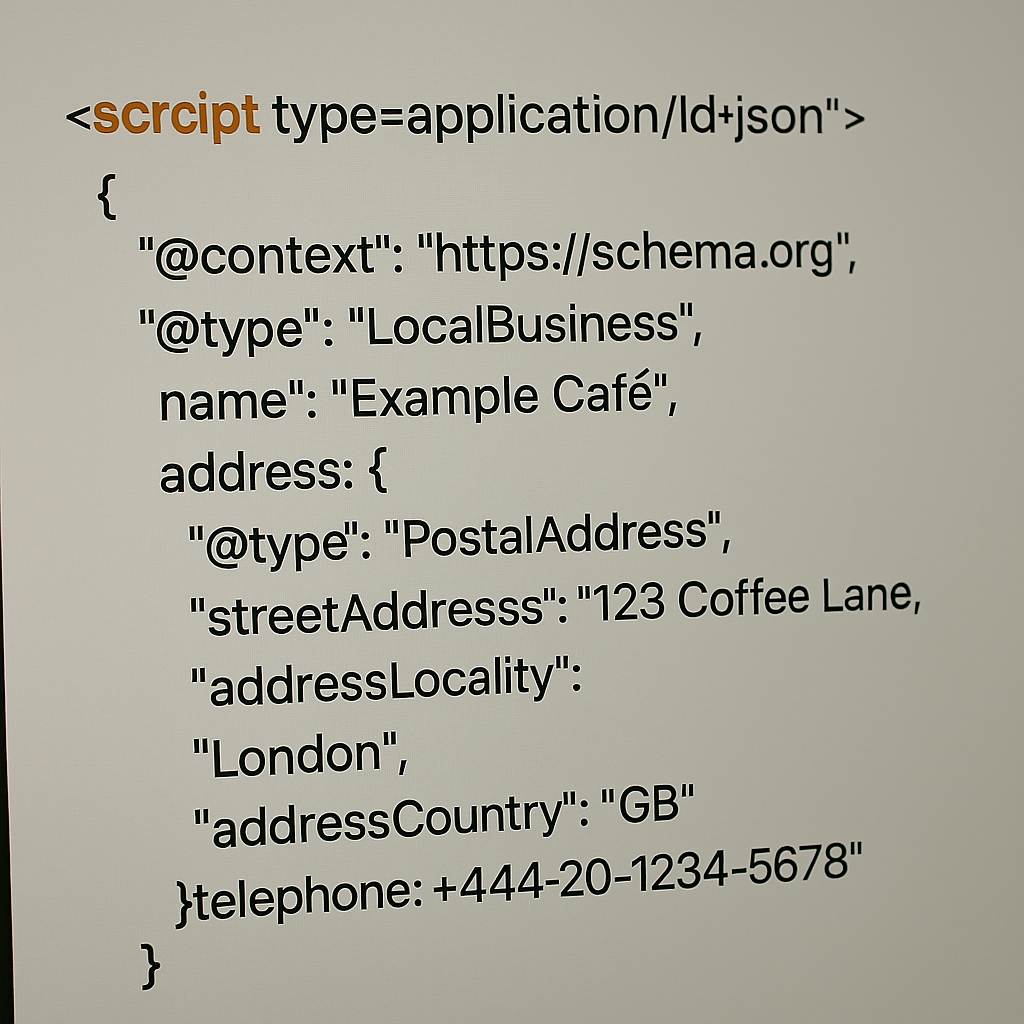
There are three main ways to implement schema: RDFa, Microdata, and JSON-LD. Google recommends JSON-LD because it is easier to implement, keeps your code clean, and is less prone to errors. JSON-LD is usually added within a <script type=”application/ld+json”> tag in your page’s <head> or <body>.
Example of simple JSON-LD for a local business:
3. Add Schema Sitewide or Page-by-Page
- Sitewide: For schemas like WebPage or BreadcrumbList, you can add the markup globally through your CMS, theme settings, or via Google Tag Manager.
- Page-specific: For schemas like Product, Article, or FAQPage, you’ll need to add the JSON-LD directly to the relevant page. Many CMS platforms allow a custom script field in the page settings for this purpose.
4. Use Schema Markup Generators
If you don’t want to write code manually, there are free generators like TechnicalSEO.com Schema Generator or Google’s Structured Data Markup Helper. Input your content details, and they will produce JSON-LD markup ready to add to your site.
5. Test and Validate
After implementing schemas, it’s crucial to test it:
- Use Schema.org’s validation tool to check for syntax errors.
- Use Google’s Rich Results Test to see which rich results your page is eligible for.
Always fix errors – warnings are optional, but can help improve your markup. Proper validation ensures search engines can read and display your structured data correctly.
Need help adding schemas to your website? Check out our professional Web Development services to get your pages fully optimised and eligible for rich results.
How Schema Markup Works
Now that you know how to add schema markup, let’s explore how it works behind the scenes.
Communicating with Search Engines
Schema markup acts as a “translator” between your content and search engines. It provides context to your pages, helping search engines understand the type of content, key elements, and how users might interact with it.
For example, a recipe page without schema may only show a title, URL, and meta description. With Recipe schema, search engines can pull prep time, ingredients, calories, and ratings to display a rich snippet. This extra clarity can boost visibility and click-through rates.
Enabling Rich Results
When search engines read schema markup, they can create rich results: enhanced listings on search pages with images, ratings, breadcrumbs, event dates, and more. Rich results are visually appealing and occupy more space on SERPs, increasing the chance of user clicks.
Example:
- Simple search result: Shows title, URL, and meta description.
- Rich result with schema: Adds star ratings, images, FAQs, or event info.
Improving Indexing
Search engines use schema to better categorise and index your content. By explicitly defining page elements, search engines are more confident about the relevance of your pages, which can indirectly support SEO and increase visibility.
Supporting Voice Search
Schema markup also helps with voice search on devices like Google Home, Alexa, or Siri. Structured data allows these assistants to extract precise answers from your pages, enabling faster, more accurate responses for queries like “Where is the nearest café?” or “Show me vegan cookie recipes.”
Want to make your content work harder and reach more users? Explore our expert Content Marketing services to optimise your pages with effective schemas and boost search visibility.
Where Schema Markup Displays Rich Results
Schema markup can transform the way your pages appear in search results by enabling rich results. Unlike standard search listings that show only a title, URL, and meta description, rich results can include extra information that makes your page more engaging and clickable.Some of the common areas where schema markup can generate rich results include:
Recipes
When you add schema markup to a recipe page, search engines can display cooking time, ingredients, calories, and even user reviews. This makes your recipe immediately more informative to users.
Events
Event pages with schema can show dates, times, locations, and ticket availability right in the search result. Users can quickly see if the event suits them without visiting the page first.
Products and Offers
Product pages benefit from review stars, pricing, availability, and promotions being displayed directly in search results. This can improve click-through rates and give your page more visibility.
Articles and Blog Posts
News articles or blog posts can show featured images, publication dates, and author information. This increases trust and signals freshness, which can improve user engagement.
Local Businesses
LocalBusiness schema can enhance Google’s display of your business with contact details, location, and operating hours. This is especially useful for users searching on mobile devices.
FAQs and Q&A
Pages with frequently asked questions can display expandable answers directly in search results. This allows users to find the information they need immediately, reducing bounce rates.
Videos
Video schema lets search engines show a preview thumbnail, duration, and description. Users are more likely to click when they can see exactly what the video offers.
Breadcrumbs
Breadcrumb markup shows a trail of pages in your website hierarchy. It helps search engines understand site structure and improves navigation for users directly in the search results.
Voice Search and Speakable Content
With the rise of smart assistants, schema can help content be read aloud via text-to-speech (TTS) using Google’s Speakable markup. This opens opportunities for voice search results.
Using schema markup across these areas increases your chances of appearing as a rich result in search engines, making your content more visible, trustworthy, and engaging.
Unlock the Power of Schema Markup
Schema markup is your secret weapon for helping search engines truly understand your content. By adding structured data, your pages can stand out with rich results, attract more clicks, and improve indexing. Whether it’s products, articles, events, or local business info, the right schema gives search engines the context they need to showcase your content effectively.
Getting started is easier than it seems. Use JSON-LD, pick the right schema types, validate your markup, and watch your website become more visible and engaging.Don’t wait – add schema markup to your pages today and turn ordinary search results into eye-catching, clickable listings that drive traffic and growth.