In the ever-evolving world of digital marketing, agencies are constantly seeking innovative ways to expand their services, cater to a broader clientele, and remain competitive. One such powerful strategy that has gained significant momentum in recent years is the adoption of white label services. As a digital marketer, you may have come across the term but are unsure of its meaning and potential impact on your agency’s growth. Fear not, for this comprehensive guide will unravel the what are white label services and demonstrate how they can revolutionize your agency’s success.
What are White Label Services? Their Impact to Your Success
Understanding White Label Services
What are White Label Services?
White label services, also known as private label services, refer to outsourcing specific tasks or services to a third-party provider who delivers the service under your agency’s brand name. In simpler terms, it allows your agency to offer a range of additional services to your clients without the need to expand your in-house team or expertise.
How Do White Label Services Work?
When you engage a white label service provider, they work as a silent partner, performing the requested tasks while maintaining confidentiality. This collaboration ensures that your agency can seamlessly integrate these services into your existing offerings and present a unified brand image to your clients.
What are White Label Services? Their Impact to Your Success
The Benefits of White Label Services for Your Agency
1. Expanding Service Portfolio
White label services open doors to new horizons by enabling your agency to expand its service portfolio effortlessly. Whether it’s SEO, local SEO, global SEO, on-page SEO, off-page SEO, eCommerce SEO, PPC, content marketing, social media marketing, email marketing, web development, web design, or graphic design, these services can be readily offered to your clients without investing in hiring new talent or upskilling your team.
2. Saving Time and Resources
By leveraging white label services, your agency can save valuable time and resources that would otherwise be spent on recruiting and training additional employees. Instead, you can focus on building and nurturing client relationships, delivering outstanding customer service, and exploring new growth opportunities.
3. Enhancing Service Quality
White label service providers are specialists in their respective fields, so you can rest assured that the services delivered will be of top-notch quality. This enables your agency to maintain high customer satisfaction levels and build a reputation for excellence in the market.
4. Scaling Your Business
With white label services taking care of the technical aspects, your agency can focus on scaling its operations. You can cater to a larger client base, take on more projects simultaneously, and establish your agency as a dominant player in the digital marketing industry.
5. Brand Consistency
White label services ensure brand consistency across all services offered by your agency. Clients will associate your brand with exceptional quality, regardless of whether the service is delivered in-house or through a white label partner.
6. Cost-Effectiveness
Investing in infrastructure, training, and tools required for delivering various services in-house can be expensive. White label services provide a cost-effective alternative, allowing your agency to offer a wide range of services without a substantial initial investment.
What are White Label Services? Their Impact to Your Success
FAQs about What are White Label Services
Can I Trust White Label Service Providers to Maintain Confidentiality?
Absolutely. Reputable white label service providers, like Seek Marketing Partners, understand the value of confidentiality. They work diligently to ensure that your agency’s identity remains concealed, maintaining a seamless experience for your clients.
What are White Label Services and How Can it Impact My Agency’s Profitability?
Understanding what are white label services can significantly impact your agency’s profitability. By expanding your service offerings, you can attract more clients and generate additional revenue without increasing operational costs substantially.
Will My Clients Know I’m Using White Label Services?
No, your clients won’t know you’re using white label services. The services are delivered under your agency’s branding, and the white label partner operates discreetly in the background.
Can I Rely on White Label Service Providers’ Expertise?
Yes, white label service providers are experts in their fields. They possess the knowledge and experience required to deliver top-quality services, complementing your agency’s offerings.
Is There a Minimum Volume Requirement for White Label Services?
The volume requirement may vary depending on the white label provider. Seek Marketing Partners, for instance, offers flexibility in volume, allowing you to scale services based on your clients’ needs.
What are White Label Services? Their Impact to Your Success
Conclusion
In the fiercely competitive world of digital marketing, staying ahead of the curve is essential for your agency’s success. Discovering what are white label services and how it offers the perfect solution by empowering your agency to diversify its services, maintain high quality, and expand its client base without exhausting resources. Embrace the power of white label services today, and propel your agency to new heights of growth and success. For exceptional white label services and to learn more about how Seek Marketing Partners can help you, contact us now. Let’s take your agency’s success to unprecedented levels together with top-tier SEO, local SEO, global SEO, on-page SEO, off-page SEO, eCommerce SEO, PPC, content marketing, social media marketing, email marketing, web development, web design, and graphic design services. Connect with us on Facebook, Tiktok, LinkedIn, and Instagram to stay updated with the latest trends and insights. Seek Marketing Partners, your partner in digital marketing excellence.
In the fast-paced and ever-evolving world of the hospitality industry, hotels face intense competition in attracting and retaining guests. With the rise of digital technology, the internet has become the primary platform for travellers to search, compare, and book accommodation. In such a landscape, a robust and well-crafted digital marketing strategy for hotels becomes indispensable.
In this article, we explore the significant positive impact that a professional digital marketing strategy for hotels can have on their success. We’ll delve into various aspects of digital marketing, including SEO, content marketing, social media marketing, and more. Discover how Seek Marketing Partners, a leading digital marketing agency, can empower hotels to thrive in the digital realm.
Boosting Online Visibility with SEO
SEO (Search Engine Optimization) plays a crucial role in ensuring a hotel’s online visibility. By strategically integrating relevant keywords like “digital marketing strategy for hotels” into website content, meta tags, and URLs, hotels can rank higher on search engine results pages (SERPs). This improved visibility increases the likelihood of potential guests finding and visiting the hotel’s website.
Local SEO in digital marketing strategy for hotels is especially vital for hotels, as it allows them to target potential guests within their immediate geographical area. With a well-optimized Google My Business listing, hotels can attract local guests and increase footfall to their premises.
Enhanced Website Engagement through Content Marketing
Engaging and informative content is the cornerstone of a successful digital marketing strategy for hotels. By producing valuable content related to travel, local attractions, and exclusive hotel offerings, hotels can establish themselves as industry thought leaders and build trust with potential guests.
On-Page SEO techniques in digital marketing strategy for hotels, such as optimizing meta descriptions, title tags, and headings with target keywords, further enhance content visibility and attract organic traffic. Compelling visuals, including graphic design, and immersive web design contribute to an enhanced user experience, increasing the likelihood of direct bookings.
Harnessing the Power of Social Media Marketing
In the age of social media dominance, hotels must leverage platforms such as Facebook, Twitter, LinkedIn, and Instagram to engage with their target audience. Regular updates about hotel promotions, events, and local attractions can foster a loyal online community. Hotels can also run paid PPC (Pay-Per-Click) campaigns in digital marketing strategy for hotels to boost brand exposure and drive traffic to their websites.
The Influence of Email Marketing
Email marketing remains an effective tool in digital marketing strategy for hotels to nurture leads and retain existing customers. By sending personalized offers, updates, and exclusive deals, hotels can entice potential guests to book a stay. Additionally, automated email campaigns can help hotels maintain communication with guests throughout their customer journey.
Responsive Web Development for Optimal Performance
In the digital age, having a mobile-friendly website is crucial. Responsive web development in digital marketing strategy for hotels ensures that a hotel’s website adapts seamlessly to various devices, providing a smooth user experience. This enhances customer satisfaction and encourages longer browsing sessions, ultimately increasing the likelihood of direct bookings.
FAQs for Digital Marketing Strategy for Hotels
How can digital marketing increase hotel bookings?
A well-executed digital marketing strategy enhances a hotel’s online presence, attracts more website visitors, and increases direct bookings.
Can digital marketing improve a hotel’s reputation?
Yes, digital marketing allows hotels to showcase their unique offerings and engage with guests, leading to improved online reputation.
Conclusion
In conclusion, a professional digital marketing strategy for hotels can have a transformative impact on their success. By harnessing the power of SEO, content marketing, social media, email marketing, and responsive web development, hotels can enhance their online visibility, engage with their target audience, and increase direct bookings. Seek Marketing Partners’ expertise in digital marketing, including white label services, positions them as the ideal partner for hotels seeking to thrive in the digital realm. For all your digital marketing strategy for hotels needs, from SEO to web design and beyond, contact Seek Marketing Partners today. Connect with us on social media platforms like Facebook, Tiktok, LinkedIn, and Instagram to stay updated on the latest industry trends and insights.
In today’s fast-paced digital world, having a robust online presence is crucial for businesses across industries, including insurance companies. Embracing a comprehensive digital marketing strategy for insurance companies has become imperative for reaching potential clients and staying ahead of the competition. In this article, we will explore the significance of digital marketing for insurance companies and how agencies like Seek Marketing Partners can play a pivotal role in ensuring their success.
The Digital Transformation of Insurance Marketing
Gone are the days when insurance marketing solely relied on traditional methods such as print media and word-of-mouth. With the advent of digital marketing strategy for insurance companies, the industry has undergone a significant transformation. Today, customers are more tech-savvy and prefer conducting research online before making any purchase decisions, including insurance policies. As a result, insurance companies must adapt and embrace digital marketing strategies to connect with their target audience effectively.
Understanding the Role of Digital Marketing Strategy for Insurance Companies
Digital marketing strategy for insurance companies provides a plethora of opportunities to engage, inform, and convert potential customers. Through various online channels, insurance companies can now reach their target audience directly, cutting through the noise of traditional advertising. Additionally, digital marketing enables precise targeting, ensuring that the right message reaches the right audience at the right time. This targeted approach not only enhances conversion rates but also saves valuable marketing resources.
How Seek Marketing Partners Can Assist Insurance Companies with Digital Marketing
Seek Marketing Partners, a leading digital marketing agency, specialises in creating digital marketing strategy for insurance companies to maximise their online presence and drive business growth. Here are some key areas where Seek Marketing Partners can make a significant impact:
Tailoring SEO Strategies for Insurance Companies
In the highly competitive digital landscape, having a strong search engine presence is crucial for insurance companies. Seek Marketing Partners understands the nuances of the insurance industry and can create bespoke SEO strategies in digital marketing strategy for insurance companies to boost organic visibility. This includes local SEO techniques to target specific geographical areas, such as “Insurance companies in London,” and global SEO strategies to expand the company’s reach across different regions. On-page SEO optimizations ensure that the website’s content is search-engine-friendly, while off-page SEO techniques help build authoritative backlinks to boost search rankings further.
Local SEO for Targeted Reach
Local SEO plays a vital role in helping insurance companies connect with potential clients in their local area. Seek Marketing Partners’ digital marketing strategy for insurance companies can optimise the insurance company’s website and Google My Business listing for location-based keywords, making it easier for customers to find them when searching for insurance services in the area. By enhancing online visibility within their immediate community, insurance companies can increase foot traffic to physical locations and boost inquiries for local agents.
Global SEO for Expanding Reach
For insurance companies looking to expand their reach beyond borders, global SEO strategies are essential. Seek Marketing Partners’ digital marketing strategy for insurance companies can implement tactics to improve the company’s search rankings in various countries and regions. This involves keyword research and localization to ensure the content resonates with the target audience in each market. By reaching out to a wider audience, insurance companies can tap into new markets and grow their international clientele.
On-Page SEO for Optimised Web Pages
On-page SEO is the foundation of a well-optimised website. Seek Marketing Partners can conduct a comprehensive audit of the insurance company’s website and implement crucial on-page SEO elements. This includes optimising meta titles, meta descriptions, headers, and content with relevant keywords related to insurance services. Additionally, Seek Marketing Partners’ digital marketing strategy for insurance companies ensures that the website’s structure is user-friendly, making it easier for visitors to navigate and find the information they need.
Off-Page SEO for Building Authority
Building authority in the insurance industry is vital for gaining the trust of potential customers. Seek Marketing Partners’ digital marketing strategy for insurance companies can devise off-page SEO strategies that focus on creating valuable content and building high-quality backlinks from reputable websites. By showcasing the insurance company as an industry leader, Seek Marketing Partners helps increase brand credibility and visibility, driving more organic traffic to the website.
E-commerce SEO for Online Insurance Sales
For insurance companies with online sales platforms, Seek Marketing Partners can optimize the e-commerce website to increase conversions. This involves implementing ecommerce SEO strategies in digital marketing strategy for insurance companies that focus on improving product pages, optimizing the checkout process, and enhancing the overall user experience. By streamlining the online purchasing journey, insurance companies can boost online sales and offer customers a seamless buying experience.
The Power of PPC Advertising
Pay-per-click (PPC) advertising is an effective way for insurance companies to drive targeted traffic to their website and generate leads. Seek Marketing Partners’ digital marketing strategy for insurance companies can create compelling ad campaigns that target specific keywords and demographics, ensuring that insurance companies only pay for clicks from potential customers interested in their services. By leveraging PPC, insurance companies can see immediate results and increase their visibility on search engines and social media platforms.
Leveraging Social Media for Brand Visibility
Social media platforms have become powerful marketing tools for insurance companies to connect with their target audience on a personal level. Seek Marketing Partners’ digital marketing strategy for insurance companies can help establish a strong presence on popular platforms such as Facebook, Twitter, LinkedIn, and Instagram. Through engaging content, including informative posts, interactive polls, and visually appealing graphics, Seek Marketing Partners can increase brand awareness and foster a loyal online community.
Crafting Engaging Content Marketing Campaigns
In the digital landscape, content is king. Seek Marketing Partners’ digital marketing strategy for insurance companies can devise content marketing strategies that resonate with the insurance company’s target audience. This includes creating informative blog posts, educational videos, and visually engaging infographics. By offering valuable content that addresses customers’ pain points and queries, insurance companies can position themselves as trusted advisors in the industry, nurturing potential customers into loyal clients.
Nurturing Leads with Effective Email Marketing
Email marketing remains one of the most effective ways to nurture leads and maintain a strong relationship with existing customers. Seek Marketing Partners’ digital marketing strategy for insurance companies can create personalised email campaigns that deliver relevant content and offers to potential clients based on their interests and interactions with the insurance company’s website. Through targeted email marketing, insurance companies can increase customer retention and drive repeat business.
Developing User-Friendly Web Design and Development
A user-friendly website is essential in digital marketing strategy for insurance companies to leave a positive impression on visitors. Seek Marketing Partners’ expert web designers and web developers can create visually appealing and intuitive websites that are easy to navigate. Mobile responsiveness is also prioritised to cater to the increasing number of users accessing the internet through mobile devices. By offering a seamless online experience, insurance companies can keep visitors engaged and encourage them to explore their insurance offerings further.
Utilising Graphic Design for Visual Appeal
Visual elements play a crucial role in captivating audiences and conveying brand messages effectively. Seek Marketing Partners’ talented graphic designers can create eye-catching visuals, including logos, banners, and social media graphics, that align with the insurance company’s branding. By incorporating compelling visuals into digital marketing strategy for insurance companies, they can leave a lasting impression on potential clients and strengthen brand recognition.
Conclusion
In conclusion, the role of digital marketing strategy for insurance companies cannot be underestimated in today’s digital landscape. With the expertise of agencies like Seek Marketing Partners, insurance companies can unlock the potential of digital marketing strategies to reach their target audience effectively, drive lead generation, and foster brand loyalty. From tailored SEO strategies for local and global reach to engaging content marketing campaigns and effective email marketing, Seek Marketing Partners’ team of experts offers a comprehensive suite of services that can elevate insurance companies’ online presence and drive business growth. So, if you want to enhance your insurance company’s digital marketing strategy, contact us at Seek Marketing Partners and let us help you achieve your business goals. Connect with us on social media through Facebook, Tiktok, LinkedIn, and Instagram to stay updated with the latest digital marketing trends and insights.
In today’s highly competitive business landscape, digital marketing has become a vital tool for businesses across various industries. Indian restaurants, in particular, can greatly benefit from leveraging digital marketing strategies to reach a wider audience and increase their customer base. In this article, we will explore the numerous advantages of Indian restaurant digital marketing and how Seek Marketing Partners, a leading digital marketing agency, can help you achieve success in the online realm.
Increased Online Visibility and Brand Awareness
With Indian restaurant digital marketing, you can significantly enhance your online visibility and establish a strong brand presence. By employing effective search engine optimisation (SEO) techniques, your restaurant’s website can rank higher in search engine results pages (SERPs). Seek Marketing Partners specialises in SEO, both locally and globally, enabling your business to be discovered by potential customers searching for Indian cuisine or related keywords.
Targeted Marketing Strategies for Higher Conversions
Indian restaurant digital marketing offers targeted strategies that can boost your conversions and drive more customers to your restaurant. Seek Marketing Partners’ team of experts can help you create impactful PPC (Pay-Per-Click) campaigns, ensuring your ads are shown to the right audience at the right time. This precise targeting helps to maximise your marketing budget and generate a higher return on investment (ROI).
Local SEO to Attract Local Customers
One of the key components of Indian restaurant digital marketing is local SEO. With Seek Marketing Partners’ local SEO services, your restaurant can rank higher in local search results, making it easier for potential customers in your area to find and visit your establishment. Optimising your Google My Business listing, managing online reviews, and ensuring accurate business information are all part of the local SEO strategies that Seek Marketing Partners can implement to attract local customers to your Indian restaurant.
Global SEO for a Wider Reach
If your Indian restaurant caters to a global audience or offers delivery services, global SEO in Indian restaurant digital marketing can help you expand your reach beyond your local market. Seek Marketing Partners has extensive experience in global SEO, optimising your website to rank higher in international search results. By targeting relevant keywords and implementing effective link-building strategies, your restaurant can attract customers from around the world, increasing your customer base and revenue.
Off-page SEO in Indian restaurant digital marketing plays a vital role in building your restaurant’s online authority and reputation. Seek Marketing Partners can help you establish a strong backlink profile by implementing effective off-page SEO strategies such as guest blogging, influencer partnerships, and social media engagement. By earning high-quality backlinks from reputable sources, your Indian restaurant will gain credibility in the eyes of search engines and potential customers alike.
Harnessing the Power of Ecommerce SEO
If your Indian restaurant offers online ordering or delivery services, ecommerce SEO in Indian restaurant digital marketing is essential for driving traffic and increasing conversions on your website. Seek Marketing Partners expertise in ecommerce SEO can optimize your online ordering system, streamline the checkout process, and improve your website’s overall user experience. By making it easier for customers to place orders, you can boost your online sales and grow your business.
Leveraging Content Marketing for Engagement
Content marketing in Indian restaurant digital marketing is an integral part of any successful digital marketing strategy. Seek Marketing Partners team of content specialists can create engaging and informative content that showcases your Indian restaurant’s unique offerings, recipes, and cultural aspects. By publishing relevant blog posts, recipe guides, and social media content, you can establish your restaurant as an authoritative source in the Indian cuisine niche, attracting a loyal following of food enthusiasts.
Amplifying Reach with Social Media Marketing
Social media platforms have become powerful marketing channels, allowing Indian restaurants to connect with their target audience on a more personal level. Seek Marketing Partners can develop a comprehensive social media marketing strategy in Indian restaurant digital marketing for your restaurant, leveraging platforms like Facebook, Twitter, LinkedIn, and Instagram. Engaging posts, beautiful food photography, and interactive campaigns can all help you build a strong social media presence and connect with potential customers.
Frequently Asked Questions
What other services does Seek Marketing Partners offer?
Seek Marketing Partners provides a wide range of digital marketing services, including web development, web design, graphic design, and white label services. Our team of experts is skilled in creating visually appealing websites, user-friendly interfaces, and impactful graphic designs to enhance your online presence.
How can I connect with Seek Marketing Partners on social media?
You can connect with us on various social media platforms, including Facebook, Twitter, LinkedIn, and Instagram. Follow us for the latest updates, industry insights, and digital marketing tips. Connect with us on social media to stay informed and engaged with Seek Marketing Partners.
Conclusion
In conclusion, Indian restaurant digital marketing offers numerous benefits for businesses looking to thrive in the online realm. Seek Marketing Partners expertise in SEO, local SEO, global SEO, PPC, content marketing, social media marketing, and other digital marketing strategies in Indian restaurant digital marketing can help attract more customers, increase brand awareness, and drive higher conversions. Whether you need assistance with web development, graphic design, or white label services, Seek Marketing Partners team of professionals is ready to guide you towards digital marketing success. Contact us today to discuss how we can help with Indian restaurant digital marketing and elevate your Indian restaurant’s online presence and help you achieve your business goals.
In today’s rapidly evolving business landscape, do small companies need data science? While large corporations have historically led the way in leveraging data to drive their strategies, small companies are recognizing the crucial role that data science plays in their success. This article delves into the many reasons why small companies need data science, why it is essential for small companies in the current business environment, and how it can propel them towards success.
Do small companies need data science?
Understanding Data Science
Data science is a multifaceted field that encompasses the use of scientific methods, algorithms, and systems to extract insights and knowledge from structured and unstructured data. By applying techniques from statistics, computer science, and machine learning, data scientists analyze complex datasets to uncover patterns, trends, and correlations that can inform strategic decision-making. Understanding this field is crucial for small businesses aiming to leverage data for competitive advantage and operational efficiency.
Why Do Small Companies Need Data Science?
Because data science is crucial for their survival and growth in today’s competitive market. Small companies need data science to remain competitive and agile in an increasingly data-driven world. By harnessing the power of data analytics, small businesses can gain valuable insights into customer behavior, market trends, and operational efficiency, enabling them to make informed decisions and seize new opportunities for growth. Data science also empowers small companies to optimize their resources, streamline their operations, and differentiate themselves from competitors.
Do small companies need data science?
The Benefits of Data Science for Small Companies
Improved Decision-Making:
Data science enables small companies to make data-driven decisions based on empirical evidence rather than intuition alone. By analyzing customer data, market trends, and competitor strategies, small businesses can identify opportunities for growth, mitigate risks, and allocate resources more effectively.
Cost Efficiency:
Another reason why small companies need data science is its ability to drive cost efficiency. Data science can help small companies optimize their operations and reduce costs through improved efficiency and resource allocation. By analyzing data on sales, inventory, and supply chain management, small businesses can identify inefficiencies, streamline processes, and minimize waste, ultimately leading to cost savings and improved profitability.
Enhanced Customer Insights:
Data science provides small companies with deeper insights into customer behavior, preferences, and needs. By analyzing customer data from various sources, such as sales transactions, website interactions, and social media engagement, small businesses can identify their most valuable customers, personalize their marketing efforts, and tailor their products and services to better meet customer needs.
Competitive Advantage:
A significant reason for small companies to make use of data science is to gain a competitive advantage in the market. Data science gives small companies the tools to stay ahead of market trends, anticipate customer needs, and innovate new products and services. By leveraging data analytics and machine learning algorithms, small businesses can identify emerging opportunities, differentiate themselves from competitors, and create unique value propositions that resonate with customers.
Do small companies need data science?
Example Data Science Applicatons in Small Companies
Marketing and Customer Acquisition:
Data science revolutionizes small companies’ marketing efforts by enabling them to target the right audience with the right message at the right time. By analyzing customer data and market trends, small businesses can identify their target audience, segment customers based on demographic and behavioral characteristics, and tailor their marketing campaigns to maximize engagement and conversion rates. When you bear that in mind and ask ;do small companies need data science?’ it should be clear why the answer is yes.
Product Development and Innovation:
Data science plays a crucial role in small companies’ product development and innovation efforts by providing insights into customer needs and preferences. By analyzing market data, customer feedback, and competitor strategies, small businesses can identify opportunities for product innovation, develop new features and functionalities, and bring new products to market more quickly and efficiently.
Operational Efficiency and Optimization:
Data science helps small companies optimize their operations and improve efficiency across the organization. By analyzing data on sales, inventory, and supply chain management, small businesses can identify bottlenecks, streamline processes, and optimize resource allocation to maximize productivity and minimize costs. Again, with advantages like this on the table it should be clear – do small companies need data science? YES!
Web Design
Data science plays a crucial role in enhancing the effectiveness of small companies’ websites. By analyzing user data, businesses can gain valuable insights into how visitors interact with their websites. This information can be used to optimize the user experience, making the site more intuitive and effective. For example, heatmaps and user journey analysis can identify which parts of a website are most engaging and which need improvement. Additionally, A/B testing can help small companies experiment with different layouts, content placements, and calls-to-action to determine the most effective design elements for driving conversions and engagement
Email Marketing
Data science enhances small companies’ email marketing efforts by analyzing data from previous campaigns to identify what works and what doesn’t. By leveraging analytics, small companies can create more personalized and effective email content, leading to higher engagement rates and better conversions.
Social Media Marketing
Data science helps small companies analyze their social media performance, identify successful content, and understand audience engagement. Tools like sentiment analysis gauge public perception, while platform-specific analytics track which posts drive traffic and conversions. Leveraging analytics on platforms like LinkedIn, Twitter, Facebook, and Instagram provides valuable insights into audience behavior and campaign effectiveness.
Do small companies need data science?
Challenges Small Companies Face in Implementing Data Science
While the benefits of data science for small companies are clear, there are several challenges they may face in implementing data science initiatives:
Resource Limitations:
Investing in data analytics tools and hiring skilled data scientists can be costly, making it challenging for small businesses to compete with larger organizations.
Lack of Data Infrastructure:
Small companies may also lack the necessary data infrastructure and technology infrastructure needed to support data science initiatives. Building and maintaining data pipelines, storage systems, and analytical tools can be complex and resource-intensive, requiring significant investment in both time and resources.
Data Quality and Availability:
Without access to high-quality, reliable data, data science initiatives may yield inaccurate or misleading results, undermining their effectiveness and value. For those questioning, “do small companies need data science?” these challenges highlight the critical importance of ensuring data integrity and accessibility.
Conclusion
We started this blog by asking ‘do small companies need data science?’ and we hope by now you can see why it’s crucial for their success in today’s competitive business environment. By harnessing the power of data analytics, small businesses can gain valuable insights into customer behavior, market trends, and operational efficiency, enabling them to make informed decisions, drive innovation, and achieve sustainable growth. While implementing data science initiatives may pose challenges, the potential benefits far outweigh the risks, making it a worthwhile investment for small companies looking to stay ahead of the curve and succeed in the digital age.
The digital era offers an abundance of opportunities for businesses, especially for ambitious sole traders. Whether you’re a tradesperson, consultant, or retailer, digital marketing is a tool that can empower your business to reach new heights. The importance of digital marketing for sole traders cannot be overstated – it’s a critical factor for success in today’s competitive online marketplace. This article delves into the intricacies of digital marketing, outlining the potential it holds for sole traders.
The Essential Role of Digital Marketing for Sole Traders
The complexities of operating as a sole trader necessitate unique solutions to compete in a saturated marketplace. Here’s how digital marketing for sole traders caters to these requirements.
Crafting a Strong Online Presence
The significance of digital marketing for sole traders lies in its ability to build and solidify an online presence. To be visible to your target audience, you must rank in search engine results – that’s where Search Engine Optimisation (SEO) and Local SEO come into play.
Breaking Down SEO and Local SEO
SEO is the method of enhancing your website to achieve higher rankings in search engine results, thereby drawing in organic, or non-paid, traffic. Local SEO is particularly crucial for sole traders targeting specific geographical areas, ensuring your business appears in local search results.
Cost-Effective Marketing Techniques
Budget constraints are common for sole traders. However, channels for digital marketing for sole traders such as Pay-Per-Click (PPC) advertising and social media marketing provide impactful solutions that can bring substantial return on investment.
Exploring PPC and Social Media Marketing
An important component of digital marketing for sole traders is Pay-Per-Click advertising. PPC allows you to only pay for the ads that people click on, making it a cost-effective strategy. Meanwhile, social media platforms provide a free base for connecting with customers, with the option of paid advertising for more comprehensive reach.
Fostering Customer Relationships
Creating and nurturing relationships with customers is essential for a sole trader. Through email marketing and content marketing, you can engage customers on a more personal level, fostering a sense of community and loyalty.
The Power of Email and Content Marketing
Email marketing lets you reach your customers directly, sending personalised messages that resonate. Content marketing, on the other hand, involves creating valuable and relevant information, establishing your authority and fostering trust in your field.
Decoding Digital Marketing Services for Sole Traders
Digital marketing for sole traders comprises various services that work together to enhance a sole trader’s online presence and drive success.
The Social Media Landscape
Social media marketing involves harnessing the power of platforms like Facebook, Instagram, Twitter and LinkedIn to connect with your audience, promote your products or services, and strengthen your brand image.
Creating Valuable Content
Content marketing involves creating and sharing high-quality, relevant content to attract and engage your target audience, build brand credibility and improve your SEO performance.
Importance of Professional Web Design and Development
For sole traders, a professionally designed, easy-to-navigate, SEO-optimised website is essential. It’s often the first point of contact your customers have with your business, making it an integral part of your digital marketing strategy.
Navigating the Digital Landscape with Seek Marketing Partners
At Seek Marketing Partners, we recognise the unique challenges faced by sole traders and offer tailored digital marketing for sole traders to drive success.
Comprehensive Digital Marketing Services
Our team specialises in a range of services for digital marketing for sole traders, including SEO, PPC, social media marketing, content marketing, email marketing and web design and development.
Partnering with Seek Marketing Partners
By partnering with us, you gain access to expertise, cutting-edge tools, and personalised services, ensuring your digital marketing strategy truly aligns with your business needs and goals.
FAQs
Why is it beneficial for a sole trader to hire a professional digital marketing agency like Seek Marketing Partners?
Working with a professional agency provides you with a team of experts in digital marketing for sole traders who can navigate the constantly changing digital landscape, save you time and resources, and ensure your strategies are effective and in line with current best practices.
As a sole trader, what can I expect when I choose to work with Seek Marketing Partners?
When working with Seek Marketing Partners, you can expect a personalised approach to your digital marketing for sole traders, needs, regular communication, transparency about progress and results, and access to a team of digital marketing specialists committed to your success.
Can partnering with Seek Marketing Partners help improve my return on investment (ROI)?
Yes, Seek Marketing Partners aims to deliver digital marketing for sole traders that not only reach your target audience but also provide a significant return on investment. By constantly analysing and optimising your campaigns, Seek Marketing Partners ensures they are cost-effective and high-performing.
Conclusion
Understanding the importance of digital marketing for sole traders is the first step towards successful online business operations. With the right strategies, you can gain visibility, connect with your audience, and enhance your brand’s reputation. If you’re ready to take the leap into digital marketing for sole traders, contact us at Seek Marketing Partners. Our team of digital marketing experts are eager to help you navigate this digital landscape. Connect with us on Facebook, Twitter, LinkedIn, and Instagram, and let’s achieve digital success together.
Digital marketing has become an integral part of business strategy, evolving rapidly with technological advancements and changing consumer behaviours. In 2024, marketers face several challenges, and require adaptive strategies to stay ahead and remain successful. This article explores the key challenges of digital marketing in 2024 and provides insights on how to navigate them effectively.
Evolving Consumer Behaviour
One of the primary challenges of digital marketing in 2024 is adapting to evolving consumer behaviour. Consumers today demand personalised experiences, which necessitates a deep understanding of their preferences and behaviors. However, this demand for personalisation comes with heightened concerns over privacy and data protection. Marketers must find a balance between providing tailored experiences, and respecting consumer privacy to build trust and loyalty.
Understanding Local Consumer Behaviour
Another of the key challenges of digital marketing in 2024 is understanding and adapting to local consumer behaviour in diverse regions. Consumer preferences, purchasing habits, and communication preferences vary significantly across different markets. Marketers must conduct comprehensive market research to gain insights into the unique characteristics of each region’s target audience.
AI and Machine Learning Integration
In the context of the challenges of digital marketing in 2024 that they encountered, Artificial Intelligence (AI) and machine learning are transforming digital marketing. The rapid pace of technological advancements are amongst both the opportunities and challenges, since the integration of artificial intelligence (AI) and machine learning into marketing strategies is more prevalent than ever. These technologies offer sophisticated data analysis and automation capabilities, but their effective implementation requires significant investment and expertise. Marketers must stay updated with the latest MarTech tools and find the right balance between automation and the human touch to maintain meaningful engagement with their audience.
AI cost optimization is also becoming increasingly important, as marketers try to get the most value from AI tools while keeping spending under control and maintaining strong campaign performance.
Data Management and Analytics
In the challenges of digital marketing in 2024, data overload emerges as a significant obstacle for marketers. With the exponential growth of digital interactions, the sheer volume of data generated daily poses challenges in terms of ensuring accuracy, integrity, and extracting actionable insights to drive informed decision-making.
Data overload is a significant challenge in digital marketing. With the vast amount of data generated daily, ensuring data accuracy and integrity is crucial. Marketers need to leverage advanced analytics tools to extract actionable insights from this data, which can inform their strategies and improve decision-making. Effective data management practices, including regular audits and quality checks, are essential to maintain the reliability of data.
Content Overload and Content Strategy
In an era of content overload, standing out in the crowded digital space is increasingly difficult. Because of this the challenges of digital marketing in 2024 can include crafting engaging and unique content that captures the audience’s attention. Marketers must focus on quality over quantity, developing a content strategy that aligns with their brand values and resonates with their target audience. Effective content distribution strategies, including leveraging multiple platforms and formats, are also crucial for maximising reach and engagement – so investing in training and cutting-edge tools, and staying informed about technological advancements are essential steps to overcome the challenges of digital marketing.
SEO and Search Algorithm Updates
In the modern day SEO remains a cornerstone of good digital marketing, but keeping up with frequent search algorithm updates is challenging, as it always has been. However, add in the rise of voice search and AI-driven search results, and it’s not hard to see how SEO is still one of the main challenges of digital marketing in 2024. Marketers need to optimise their content for these new search paradigms, focusing on natural language processing and long-tail keywords. Maintaining organic reach amidst the growth of paid advertising also requires a strategic approach to content creation and distribution.
Social Media Dynamics
When talking about the challenges of digital marketing in 2024, we can’t overlook the ways in which social media platforms are constantly evolving, presenting both opportunities and challenges for digital marketers. Changes in social media algorithms can drastically affect the visibility of organic posts, requiring marketers to stay agile and adapt their strategies accordingly. Additionally, handling negative feedback and managing online reputation are ongoing challenges of digital marketing in 2024.
The dynamic nature of social media algorithms presents a significant challenge for digital marketers in 2024, as changes in these algorithms can have a direct impact on the visibility and reach of organic posts. Marketers must stay abreast of these algorithm updates and be prepared to pivot their strategies to ensure continued audience engagement and reach. The need for agility and adaptability in response to these algorithm changes is paramount, requiring marketers to constantly refine their approach to content creation and distribution on social media platforms to address the challenges of digital marketing in 2024.
Moreover, the management of online reputation and handling negative feedback has become a critical aspect of digital marketing in 2024. With the rise of social media as a primary channel for customer interactions and feedback, brands are more exposed than ever to public scrutiny and criticism. Digital marketers need to be adept at monitoring online conversations, addressing negative feedback promptly, and effectively managing brand reputation in the digital sphere. Building and maintaining a positive online reputation is essential for fostering trust and credibility with consumers, making reputation management a key focus for digital marketing strategies in the current landscape.
Social media platforms therefore present both new opportunities and new challenges for digital marketers. Navigating new features and policies requires adaptability and a keen understanding of platform dynamics. Staying updated with changes on major platforms like Facebook, Instagram, and TikTok is essential. Creating engaging, platform-specific content and building authentic relationships with influencers can enhance social media performance to overcome the challenges of digital marketing in 2024, but these strategies must be carefully managed to avoid potential pitfalls.
Regulatory and Compliance Issues
Navigating the complex landscape of regulatory and compliance issues is a major challenge for digital marketers. In 2024, regulations such as GDPR and CCPA continue to impact how companies collect and use consumer data. Ensuring compliance with these regulations requires a thorough understanding of the legal requirements and implementing robust data protection measures. Marketers must also manage cookie consent and provide transparent communication about data usage to maintain consumer trust.
Ad Blocking and Paid Advertising Challenges
The surge of ad blockers poses a notable obstacle for paid advertising efforts, compelling marketers to innovate and craft creative strategies to navigate this hurdle successfully – so of course it’s worth mentioning when we’re talking about the challenges of digital marketing in 2024. To address these challenges of digital marketing in 2024 effectively, the emphasis is on adopting non-intrusive ad formats and curating content that provides genuine value to the audience.
The surge in usage of ad blockers poses a notable obstacle for paid advertising efforts, compelling marketers to innovate and craft creative strategies to navigate this hurdle successfully. To address these challenges of digital marketing in 2024 effectively, the emphasis should be on adopting non-intrusive ad formats and curating content that provides genuine value to the audience.
Budget Constraints
Balancing ROI and Investment in Digital Marketing
In the landscape of challenges of digital marketing in 2024, budget constraints loom large as marketers navigate the complexities of allocating resources effectively. With the proliferation of digital channels and the constant evolution of consumer behaviours, optimising expenditure while achieving desirable outcomes becomes increasingly challenging.
Demonstrating ROI Amidst Scrutiny
Digital marketing budgets often face intense scrutiny from stakeholders, demanding clear evidence of return on investment (ROI). Marketers must meticulously track and analsze campaign performance, attributing conversions and revenue generation to specific marketing efforts. Demonstrating tangible results requires comprehensive analytics and reporting tools, enabling marketers to quantify the impact of their strategies in terms of revenue, leads generated, or brand engagement metrics.
Precision in Tracking and Analysis
Precise tracking of campaign performance is essential for justifying digital marketing expenditures. Marketers leverage a range of analytics platforms and metrics to monitor key performance indicators (KPIs) such as website traffic, conversion rates, click-through rates, and customer acquisition costs. By analysing data trends and identifying patterns, marketers gain insights into the effectiveness of different strategies and channels, enabling informed decision-making regarding resource allocation.
Cost-Effectiveness and Strategy Optimisation
In the face of budget constraints, marketers must identify and prioritise strategies that deliver the highest ROI. This entails conducting thorough cost-benefit analyses to evaluate the efficiency of various digital marketing tactics. Strategies that demonstrate optimal cost-effectiveness, such as targeted advertising, content optimisation, and email marketing automation, are prioritised for continued investment. Additionally, ongoing optimisation and refinement of campaigns based on performance insights help maximise ROI and mitigate budgetary constraints.
Balancing Innovation and Resource Management
Striking the right balance between investing in new technologies and managing costs is paramount for sustainable growth in digital marketing. While innovation drives competitiveness and differentiation, it also incurs additional expenses. Marketers must carefully evaluate emerging technologies and trends, assessing their potential impact on campaign performance and ROI. Investing in innovative solutions that offer tangible benefits, such as AI-powered analytics tools or immersive digital experiences, can yield long-term gains and competitive advantages.
Omnichannel Marketing Integration
The challenges of digital marketing in 2024 include the task of providing a seamless customer experience across multiple channels. Omnichannel marketing integration demands that online and offline endeavours and strategies work together to establish a unified brand experience. This process entails a deep understanding of customer journeys and the maintenance of consistency in messaging and interaction across all touchpoints. Tracking relevant metrics and Key Performance Indicators (KPIs) is essential in measuring the effectiveness of omnichannel campaigns, and of paramount importance here.
Emerging Markets and Globalisation
Another of the challenges of digital marketing in 2024 is adapting digital marketing strategies to the different regions you might operate in. Understanding local consumer behaviour and navigating various digital landscapes pose significant challenges. And marketers must tailor their campaigns to meet the specific needs and preferences of each area, considering cultural differences and local regulations. Successful globalisation therefore requires a flexible and localised approach to digital marketing.
Conclusion
The challenges of digital marketing in 2024 are multifaceted and require marketers to be agile, informed, and innovative. From evolving consumer behaviour and technological advancements to data management, content strategy, and regulatory compliance, each challenge presents an opportunity for growth and improvement. By staying updated with the latest trends, leveraging advanced tools, and adopting a customer-centric approach, marketers can navigate these challenges and drive successful digital marketing campaigns.
As the digital landscape continues to evolve, it’s crucial for marketers to remain proactive and adaptable. The future of digital marketing lies in understanding and addressing these challenges effectively, ensuring that brands can connect with their audience in meaningful ways and achieve their business goals.
By focusing on these key challenges and developing strategic solutions, digital marketers can stay ahead of the curve and thrive in the ever-changing digital environment of 2024.
Are you a small business owner wanting to boost your online presence? Pay-per-click (PPC) advertising could be the key to achieving just that. In today’s digital age, PPC management for small businesses is an essential tool for reaching new customers, increasing sales, and growing your brand. The beauty of PPC is that it allows you to control your advertising spending while targeting the right audience, which is especially crucial when you’re working with a limited budget. A well-managed PPC campaign can level the playing field and allow your business to compete alongside larger competitors.
PPC, or pay-per-click advertising, is when you pay each time someone clicks on your online ad. It’s a great way for small businesses to get noticed quickly. But to make it work well, you need to be smart about how you use it.
This guide provides seven practical tips to help you make the most out of your PPC campaigns. Whether you’re a newcomer or looking to improve your existing campaigns, these actionable tips will help you fine-tune your approach, maximise your ROI, and achieve meaningful growth for your small business. By setting clear goals, doing effective keyword research, crafting compelling ads, and optimising landing pages, you can ensure your PPC efforts drive the best possible results. With the right strategy in place, even small businesses can see big rewards from their PPC advertising.
Key Points for PPC Management for Small Businesses
Set clear and measurable goals for your PPC campaigns
Conduct thorough keyword research to target the right audience
Create compelling ad copy that resonates with your target market
Optimise landing pages for better conversion rates
Monitor and adjust campaigns regularly for optimal performance
Utilise ad extensions to enhance visibility and click-through rates
Before starting a PPC campaign, it’s essential to define exactly what you want to achieve. Setting clear, measurable goals helps you stay focused and ensures your PPC efforts align with your broader business objectives. These goals should be specific, measurable, achievable, relevant, and time-bound (SMART). For example, if you own a local coffee shop, your goal might be to increase foot traffic by 25% within the next three months. If you’re running an online store, you might want to boost sales by 20% within the next quarter. By establishing such clear goals, you’ll know exactly what success looks like.
It’s also important to set Key Performance Indicators (KPIs) to track your progress. KPIs are metrics that will help you measure how effectively your campaign is meeting its objectives. These could include metrics such as:
Click-through rate (CTR): See how many people are clicking on your ads.
Conversion rate: How many clicks lead to sales, sign-ups, or other desired actions.
Cost per click (CPC): How much you’re paying for each visitor to your website.
Return on ad spend (ROAS): How much revenue you’re generating for every dollar spent on PPC.
Know Your Audience Well
Understanding who you’re trying to reach is really important for small business PPC success. Use tools like Google Analytics to learn about your website visitors. This information helps you make ads that speak directly to what your potential customers need and like. You should also look into things like age, interests, and online behavior to create detailed pictures of your ideal customers.
For example, if you run a local bakery, you might want to reach people searching for “fresh bread near me” or “birthday cakes in [your city]”. The more specific you can be, the better chance you have of reaching the right people. You can also create customer personas based on these insights which can help you craft ads that feel more personal and directly relevant to their needs. The more targeted your ads are, the higher your chances of driving conversions.
Do Good Keyword Research
Keywords are super important for any PPC campaign. Start by listing words related to your business, then use tools like Google’s Keyword Planner to find more ideas and see how often people search for them. Think about why people might be searching for these words – are they just looking for information, trying to find a specific website, or ready to buy something?
Don’t forget about long-tail keywords – these are longer, more specific phrases. They might not be searched for as often, but people who use them are often more likely to buy. For example, “affordable handmade leather wallets” are likely to attract more serious buyers than just “wallets”. As you run your campaigns, be sure to regularly review and adjust your keyword list based on the performance data. Some keywords may bring in high-quality leads, while others might underperform. By consistently analysing this data, you can refine your keyword strategy and ensure that you’re targeting the most relevant audience for your business.
Write Good Ad Copy
Your ad needs to grab attention and make people want to click. Here are some tips to make your ads stand out:
Use your main keyword in the headline
Highlight what makes your business special
Include a clear call-to-action (CTA) that tells people what to do next
Try different types of ads to see what works best
Use words that connect with your audience emotionally
Include numbers and facts to make your claims more believable
Testing different versions of your ads can help you find what works best. Keep improving your ads based on how well they perform to get more clicks and sales over time. Split testing, also known as A/B testing, is a great strategy to identify which ad copy resonates best with your audience. Keep refining your approach to continually improve ad performance and engagement.
Make Your Landing Pages Better
Getting clicks is only part of the job. Once people get to your website, you need to convince them to take action. Make sure that your landing pages are:
Relevant to the ad they clicked on
Fast to load
Easy to use on mobile phones
Clear and easy to navigate
Focused on one main action you want people to take
Include things that build trust, like customer reviews
Remember, a good landing page can make a big difference in how well your PPC campaign works. Keep testing and improving your landing pages to get more people to take action. If users are landing on your page and leaving quickly, it may be a sign that your message, page layout, or user experience needs some adjustments. A well-designed landing page can significantly improve your conversion rates and ROI.
Watch and Adjust Your Campaigns
PPC management for small businesses isn’t something you set up and forget. You need to regularly check how your campaigns are doing and make changes. Keep an eye on things like:
How many people click on your ads
How many of those clicks turn into sales or leads
How much each click cost you
How Google rates your ads
How much money you’re making compared to what you’re spending
If something’s not working, change it. You might need to adjust how much you’re paying for clicks, try new keywords, or improve your ad text. Use the data you collect to guide your decisions and keep making your PPC strategy better. Adjusting your campaigns in real-time is key to staying competitive and ensuring that you’re getting the most value from your ad spend.
Use Ad Extensions
Ad extensions are extra bits of information you can add to your ads, like your phone number, address, or links to specific pages on your site. They make your ads bigger and more informative, which can lead to more people clicking on them. Some useful ad extensions include:
Links to other pages on your site
Your phone number for easy calling
Your location to help local customers find you
Prices of your products or services
Highlights of specific features or categories
Using ad extensions well can give you an advantage over other businesses that might not be using them. They give potential customers more information and can really improve how well your ads perform in search results. They also provide users with more options to engage with your business, helping to increase click-through rates and drive more qualified traffic to your site.
Conclusion: Effective PPC Management for Small Business Growth
PPC advertising for small businesses can be a powerful tool when used correctly. By setting clear goals, understanding your audience, doing good keyword research, writing compelling ads, improving your landing pages, watching your performance, and using ad extensions, you can create campaigns that work for your business.
Remember, effective small business PPC takes time and effort. You need to be willing to learn and adapt. But with these tips and some patience, you can create PPC campaigns that help your small business grow and do well online.Need help getting started with PPC management for your small business? Get in touch with Seek Marketing Partners today. Our team can help you create and manage PPC campaigns that get real results for your business. We’ll work closely with you to develop a PPC strategy that fits your business goals and budget, making sure you get the most out of your online advertising. Let us help you drive traffic, increase sales, and grow your business in the digital landscape.
When HTTPS pages lead to HTTP pages, it creates security vulnerabilities, affects SEO rankings, and disrupts user trust. This issue, known as mixed content, occurs when a secure page contains elements—links, images, scripts, or stylesheets—loaded over HTTP instead of HTTPS. Search engines penalise websites with mixed content, and modern browsers may block or warn users about unsecured elements.
Why HTTPS Pages Lead to HTTP Pages
Hardcoded HTTP Links: Some websites still have absolute HTTP links embedded in the code. If a site was originally on HTTP and later migrated to HTTPS, these outdated links could lead to mixed content warnings.
Incorrect Redirects: Misconfigured redirects can unintentionally redirect HTTPS pages to HTTP pages. If your server is not set up correctly, pages may fall back to HTTP, reducing security.
External Resources on HTTP: If a page loads images, scripts, stylesheets, or third-party assets over HTTP, browsers may display warnings or block them entirely. This can break page functionality and cause trust issues.
Misconfigured CMS or Plugins: Some content management systems (CMS) or plugins may default to HTTP, leading to inconsistent behaviour across a website.
How to Fix HTTPS Pages Lead to HTTP Page
When HTTPS pages lead to HTTP pages, it creates security risks, affects user trust, and lowers SEO rankings. If links on HTTPS pages lead to an HTTP page, browsers may display “Not Secure” warnings, driving visitors away. Fixing these issues ensures a safer, fully optimised website.
Update Internal Links
One of the most common reasons HTTPS pages lead to HTTP is outdated internal links. Some internal links may still point to HTTP, even after switching to HTTPS, causing security warnings and SEO issues.
How to Fix It:
Check all pages, menus, and buttons for links still using HTTP.
Update internal links in your content management system (CMS) or database.
Use SEO tools or a site crawler to detect and fix outdated links.
Pro Tip: A bulk search-and-replace tool can speed up the process if your site has many pages.
Set Up Proper Redirects
If visitors or search engines can still access your site’s HTTP version, they may land on outdated pages instead of secure ones. Redirecting all HTTP traffic to HTTPS prevents this issue.
Pro Tip: If redirects aren’t working correctly, clear your site cache and test again.
Use Content Security Policy (CSP)
A Content Security Policy (CSP) helps prevent mixed content issues by ensuring all site resources load securely. Blocking insecure elements prevents situations where links on HTTPS pages lead to HTTP pages.
Pro Tip: Some website platforms offer security settings that help enforce HTTPS for all resources.
Fix Mixed Content Warnings
If links on HTTPS pages lead to an HTTP page, your site may be loading images, scripts, or stylesheets from non-secure sources. Browsers flag this as “mixed content,” which can cause broken elements or security alerts.
Check Plugin and Theme Compatibility
Some website themes or plugins may contain outdated code that forces HTTP links, causing HTTPS pages to lead to HTTP pages. This is common in older themes or third-party plugins not updated for HTTPS compatibility.
Pro Tip: If a specific plugin is causing the issue, check its documentation or contact support for an HTTPS-compatible solution.
Final Thoughts
If HTTPS pages lead to HTTP pages, this can compromise security, damage SEO rankings, and reduce user trust. Fixing these issues requires updating internal links, implementing proper redirects, enforcing a Content Security Policy (CSP), resolving mixed content errors, and ensuring plugin/theme compatibility.
A secure website protects user data and enhances SEO and search engine visibility. Addressing these issues ensures a seamless and trustworthy browsing experience for your visitors.
Your domain name is important for your website. It’s like your address on the internet. While it doesn’t directly affect how well your site shows up in search results, it can make a difference in other ways. Let’s look at how domain names and SEO work together.
Key Points: Domain Names and SEO
Indirect SEO impact: Domain names affect SEO through user experience
Brand recognition: Right domain boosts brand recognition and trust
Length: SEO-friendly domains are 6-14 characters long
Simplicity: Avoid hyphens and numbers in domain names
Relevance: Choose domain reflecting brand or keywords
Memorability: Make domain easy to remember and type
Trustworthiness: Use popular top-level domains for credibility
User experience: Good domain improves click-through rates
Domain age: Older domains may have SEO advantages
Migration: Careful planning required when changing domains
The Role of Domain Names in SEO
Domain names are like the addresses for websites. They don’t directly make your site rank higher, but they can help in other ways. Our SEO experts at Seek Marketing Partners know how to pick good domain names that help your overall online marketing.
A good domain name can help your website by:
Making your brand easier to remember
Getting more people to click on your site in search results
Making people trust your site more
Supporting your other marketing efforts
What Makes a Good Domain Name for SEO
When picking a domain name that helps with SEO, think about these things:
Keep it short and simple: Try to make it 6-14 letters long, and don’t use hyphens or numbers.
Make it relevant: Choose a name that fits your brand or includes words related to what you do.
Make it easy to remember: People should be able to remember and type your domain easily.
Use trusted endings: Endings like .com, .net, or .org make your site seem more trustworthy.
Also, remember these tips:
Don’t copy someone else’s trademark
Pick a name that can grow with your business
If you’re targeting a specific area, you might want to include location words
Our on-page SEO services can help you make your domain name and other parts of your website better for search engines.
How to Choose a Domain Name
When picking a domain name, you can try these approaches:
Use your company name to make your brand stronger.
Include words related to what you do to give people a hint about your website.
Mix your brand name with related words for a balanced approach.
Each way has good and bad points:
Using your company name is great for building your brand, but it might not tell people what you do right away.
Using related words can help show what your site is about, but it might limit you as your business grows.
Mixing both can give you the benefits of branding and showing what you do.
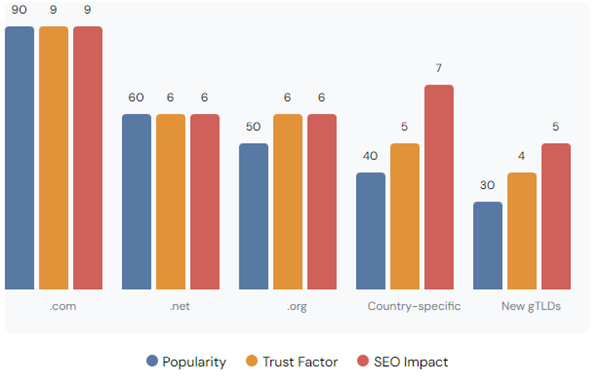
The ending of your domain (like .com or .org) can change how people and search engines see your website. Here’s a look at some common endings and what they mean:
Top-Level Domains (TLDs): Popularity, Trust, and SEO Impact
When choosing a domain ending, think about who you want to reach and what your business goals are. Most people prefer .com domains because everyone knows them, but country-specific endings can be good if you’re focusing on one country. New endings like .shop or .blog can describe what you do, but it might take more work to make people trust them.
Our global SEO services can help you figure out the best domain strategy if you want to reach people all around the world.
How Domain Names Affect User Experience
Your domain name can really change how people feel about your website, which then affects your SEO. A good domain name can:
Make more people click on your site in search results
Help people remember your brand
Make people trust your site more
Keep people on your site longer
Get more people to type your web address directly
To make your domain name better for users:
Make sure it’s easy to spell and say
Don’t use confusing words
Think about how it looks in a web address and when it’s printed
Ask some potential customers what they think before you decide
Our e-commerce SEO services can help make everything from your domain name to your product pages work well together, which can help your online store do better.
How Old Domains Affect SEO
The age of a domain isn’t directly used to rank websites, but older domains often have some advantages. They might have more links from other sites and be seen as more trustworthy. But don’t worry if you’re starting with a new domain. With good SEO work, you can still get your site to rank well over time.
Here are some things to know about domain age:
Older domains might have more links naturally
Search engines might trust established domains more
New domains can still rank well with good content and SEO
What’s on your site and how good it is matters more than just how old the domain is
Changing Your Domain Name and SEO
Changing your domain name can be risky for your SEO if you don’t do it carefully. Here’s how to do it right:
Plan everything out before you start
Set up proper redirects from your old site to your new one
Update all the links within your site
Tell search engines about the change
Watch how your site does after the change
Other important steps include:
Updating your Google Search Console and Analytics
Telling your email subscribers and social media followers
Checking and updating links from other sites where you can
Doing a full SEO check after the change
At Seek Marketing Partners, we’ve helped lots of clients change their domain names without hurting their search rankings.
Keeping an Eye on Your Domain’s Performance
To make sure your domain is helping your SEO, you need to check how it’s doing regularly. Use tools to track things like:
How authoritative your domain is
How many links you have from other sites
How much traffic you get from search
Where you rank for important keywords
How many people click on your site in search results
How long people stay on your site
How well your site works on phones and how fast it loads
Looking at these things regularly will help you see what you can improve. Our SEO monitoring services at Seek Marketing Partners can help you keep track of how your domain is doing and make smart decisions to improve your search visibility.
Conclusion: Making the Most of Your Domain for SEO
While your domain name isn’t everything for SEO, it’s an important part. A good domain can help your brand, make things better for users, and contribute to your overall SEO success. Remember these key points:
Choose a domain that’s short, easy to remember, and related to your business
Think about how the ending of your domain affects how people see your site
Make sure your domain is easy for users
Be careful when changing domains to keep your SEO value
Keep checking how your domain is doing as part of your SEO work
At Seek Marketing Partners, we’re here to help you with everything about domain names and SEO. Our team can help you choose a domain, change domains if you need to, and keep improving your site to rank better in search engines.
Want to make your SEO even better? Contact Seek Marketing Partners today to learn how we can help you pick the perfect domain name and create an SEO plan that’s just right for your business goals.