When HTTPS pages lead to HTTP pages, it creates security vulnerabilities, affects SEO rankings, and disrupts user trust. This issue, known as mixed content, occurs when a secure page contains elements—links, images, scripts, or stylesheets—loaded over HTTP instead of HTTPS. Search engines penalise websites with mixed content, and modern browsers may block or warn users about unsecured elements.
Why HTTPS Pages Lead to HTTP Pages
Hardcoded HTTP Links: Some websites still have absolute HTTP links embedded in the code. If a site was originally on HTTP and later migrated to HTTPS, these outdated links could lead to mixed content warnings.
Incorrect Redirects: Misconfigured redirects can unintentionally redirect HTTPS pages to HTTP pages. If your server is not set up correctly, pages may fall back to HTTP, reducing security.
External Resources on HTTP: If a page loads images, scripts, stylesheets, or third-party assets over HTTP, browsers may display warnings or block them entirely. This can break page functionality and cause trust issues.
Misconfigured CMS or Plugins: Some content management systems (CMS) or plugins may default to HTTP, leading to inconsistent behaviour across a website.
How to Fix HTTPS Pages Lead to HTTP Page
When HTTPS pages lead to HTTP pages, it creates security risks, affects user trust, and lowers SEO rankings. If links on HTTPS pages lead to an HTTP page, browsers may display “Not Secure” warnings, driving visitors away. Fixing these issues ensures a safer, fully optimised website.
Update Internal Links
One of the most common reasons HTTPS pages lead to HTTP is outdated internal links. Some internal links may still point to HTTP, even after switching to HTTPS, causing security warnings and SEO issues.
How to Fix It:
Check all pages, menus, and buttons for links still using HTTP.
Update internal links in your content management system (CMS) or database.
Use SEO tools or a site crawler to detect and fix outdated links.
Pro Tip: A bulk search-and-replace tool can speed up the process if your site has many pages.
Set Up Proper Redirects
If visitors or search engines can still access your site’s HTTP version, they may land on outdated pages instead of secure ones. Redirecting all HTTP traffic to HTTPS prevents this issue.
Pro Tip: If redirects aren’t working correctly, clear your site cache and test again.
Use Content Security Policy (CSP)
A Content Security Policy (CSP) helps prevent mixed content issues by ensuring all site resources load securely. Blocking insecure elements prevents situations where links on HTTPS pages lead to HTTP pages.
Pro Tip: Some website platforms offer security settings that help enforce HTTPS for all resources.
Fix Mixed Content Warnings
If links on HTTPS pages lead to an HTTP page, your site may be loading images, scripts, or stylesheets from non-secure sources. Browsers flag this as “mixed content,” which can cause broken elements or security alerts.
Check Plugin and Theme Compatibility
Some website themes or plugins may contain outdated code that forces HTTP links, causing HTTPS pages to lead to HTTP pages. This is common in older themes or third-party plugins not updated for HTTPS compatibility.
Pro Tip: If a specific plugin is causing the issue, check its documentation or contact support for an HTTPS-compatible solution.
Final Thoughts
If HTTPS pages lead to HTTP pages, this can compromise security, damage SEO rankings, and reduce user trust. Fixing these issues requires updating internal links, implementing proper redirects, enforcing a Content Security Policy (CSP), resolving mixed content errors, and ensuring plugin/theme compatibility.
A secure website protects user data and enhances SEO and search engine visibility. Addressing these issues ensures a seamless and trustworthy browsing experience for your visitors.
Your domain name is important for your website. It’s like your address on the internet. While it doesn’t directly affect how well your site shows up in search results, it can make a difference in other ways. Let’s look at how domain names and SEO work together.
Key Points: Domain Names and SEO
Indirect SEO impact: Domain names affect SEO through user experience
Brand recognition: Right domain boosts brand recognition and trust
Length: SEO-friendly domains are 6-14 characters long
Simplicity: Avoid hyphens and numbers in domain names
Relevance: Choose domain reflecting brand or keywords
Memorability: Make domain easy to remember and type
Trustworthiness: Use popular top-level domains for credibility
User experience: Good domain improves click-through rates
Domain age: Older domains may have SEO advantages
Migration: Careful planning required when changing domains
The Role of Domain Names in SEO
Domain names are like the addresses for websites. They don’t directly make your site rank higher, but they can help in other ways. Our SEO experts at Seek Marketing Partners know how to pick good domain names that help your overall online marketing.
A good domain name can help your website by:
Making your brand easier to remember
Getting more people to click on your site in search results
Making people trust your site more
Supporting your other marketing efforts
What Makes a Good Domain Name for SEO
When picking a domain name that helps with SEO, think about these things:
Keep it short and simple: Try to make it 6-14 letters long, and don’t use hyphens or numbers.
Make it relevant: Choose a name that fits your brand or includes words related to what you do.
Make it easy to remember: People should be able to remember and type your domain easily.
Use trusted endings: Endings like .com, .net, or .org make your site seem more trustworthy.
Also, remember these tips:
Don’t copy someone else’s trademark
Pick a name that can grow with your business
If you’re targeting a specific area, you might want to include location words
Our on-page SEO services can help you make your domain name and other parts of your website better for search engines.
How to Choose a Domain Name
When picking a domain name, you can try these approaches:
Use your company name to make your brand stronger.
Include words related to what you do to give people a hint about your website.
Mix your brand name with related words for a balanced approach.
Each way has good and bad points:
Using your company name is great for building your brand, but it might not tell people what you do right away.
Using related words can help show what your site is about, but it might limit you as your business grows.
Mixing both can give you the benefits of branding and showing what you do.
Our local SEO services can help you pick the perfect domain name that works well for your local area and helps people find you in local searches.
Domain Endings and How They Affect SEO
The ending of your domain (like .com or .org) can change how people and search engines see your website. Here’s a look at some common endings and what they mean:
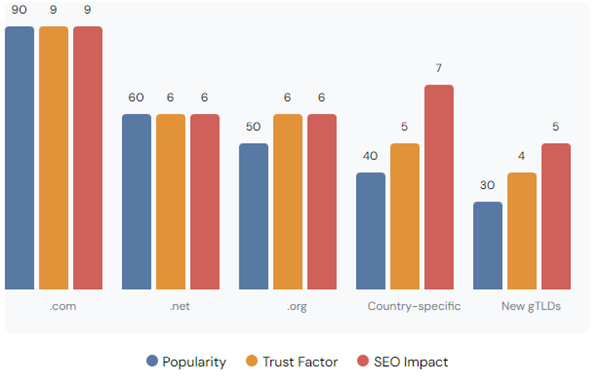
Top-Level Domains (TLDs): Popularity, Trust, and SEO Impact
When choosing a domain ending, think about who you want to reach and what your business goals are. Most people prefer .com domains because everyone knows them, but country-specific endings can be good if you’re focusing on one country. New endings like .shop or .blog can describe what you do, but it might take more work to make people trust them.
Our global SEO services can help you figure out the best domain strategy if you want to reach people all around the world.
How Domain Names Affect User Experience
Your domain name can really change how people feel about your website, which then affects your SEO. A good domain name can:
Make more people click on your site in search results
Help people remember your brand
Make people trust your site more
Keep people on your site longer
Get more people to type your web address directly
To make your domain name better for users:
Make sure it’s easy to spell and say
Don’t use confusing words
Think about how it looks in a web address and when it’s printed
Ask some potential customers what they think before you decide
Our e-commerce SEO services can help make everything from your domain name to your product pages work well together, which can help your online store do better.
How Old Domains Affect SEO
The age of a domain isn’t directly used to rank websites, but older domains often have some advantages. They might have more links from other sites and be seen as more trustworthy. But don’t worry if you’re starting with a new domain. With good SEO work, you can still get your site to rank well over time.
Here are some things to know about domain age:
Older domains might have more links naturally
Search engines might trust established domains more
New domains can still rank well with good content and SEO
What’s on your site and how good it is matters more than just how old the domain is
Changing Your Domain Name and SEO
Changing your domain name can be risky for your SEO if you don’t do it carefully. Here’s how to do it right:
Plan everything out before you start
Set up proper redirects from your old site to your new one
Update all the links within your site
Tell search engines about the change
Watch how your site does after the change
Other important steps include:
Updating your Google Search Console and Analytics
Telling your email subscribers and social media followers
Checking and updating links from other sites where you can
Doing a full SEO check after the change
At Seek Marketing Partners, we’ve helped lots of clients change their domain names without hurting their search rankings.
Keeping an Eye on Your Domain’s Performance
To make sure your domain is helping your SEO, you need to check how it’s doing regularly. Use tools to track things like:
How authoritative your domain is
How many links you have from other sites
How much traffic you get from search
Where you rank for important keywords
How many people click on your site in search results
How long people stay on your site
How well your site works on phones and how fast it loads
Looking at these things regularly will help you see what you can improve. Our SEO monitoring services at Seek Marketing Partners can help you keep track of how your domain is doing and make smart decisions to improve your search visibility.
Conclusion: Making the Most of Your Domain for SEO
While your domain name isn’t everything for SEO, it’s an important part. A good domain can help your brand, make things better for users, and contribute to your overall SEO success. Remember these key points:
Choose a domain that’s short, easy to remember, and related to your business
Think about how the ending of your domain affects how people see your site
Make sure your domain is easy for users
Be careful when changing domains to keep your SEO value
Keep checking how your domain is doing as part of your SEO work
At Seek Marketing Partners, we’re here to help you with everything about domain names and SEO. Our team can help you choose a domain, change domains if you need to, and keep improving your site to rank better in search engines.
Want to make your SEO even better? Contact Seek Marketing Partners today to learn how we can help you pick the perfect domain name and create an SEO plan that’s just right for your business goals.
Broken internal links can be a real headache for website owners. They hurt your SEO and make it hard for visitors to use your site. But don’t worry – we’re here to help you find and fix these pesky problems. Let’s learn how to keep your website running smoothly.
Key Takeaways
Issue
Impact
Solution
Broken internal links
Hurts SEO and user experience
Regular checks and fixes
Poor site navigation
Frustrates users, increases bounce rate
Maintain consistent URL structure
Negative SEO impact
Lower search rankings
Use tools like Google Search Console
What Are Broken Internal Links?
Broken internal links are links on your website that lead to pages that don’t exist anymore. This can happen when you delete or move pages without updating the links. It’s like having a road sign that points to a place that’s no longer there. These broken links can confuse both your visitors and search engines, leading to a poor user experience and potential SEO penalties.
Here are some common reasons why internal links break:
Pages get deleted or moved without proper redirection
URLs change due to site restructuring or CMS updates
Website structure changes during redesigns
Typos in the link address during manual entry
Dynamic content that’s no longer generated
Why Fixing Broken Links Matters
Fixing broken links is super important for two main reasons:
It helps your website’s SEO (Search Engine Optimisation)
It makes your website easier for people to use
When search engines like Google find lots of broken links on your site, they might think it’s not well-maintained. This can hurt your rankings in search results. Plus, when visitors click on broken links, they get frustrated and might leave your site. That’s not good for business!
Broken links also waste your website’s “crawl budget” – the number of pages search engines will crawl on your site in a given time period. When crawlers hit dead ends, they’re not discovering your valuable content, which can impact your overall SEO performance.
How to Find Broken Internal Links
Now that we know why broken links are bad, let’s look at how to find them. There are a few different ways to do this:
1. Use Google Search Console
Google Search Console is a free tool that can show you which pages on your site are giving 404 errors (that’s the code for a page that can’t be found). Here’s how to use it:
Log into Google Search Console
Go to the “Coverage” report
Look for pages with “Not found (404)” errors
Investigate these URLs to find where they’re being linked from on your site
2. Try Website Crawling Tools
Tools like Screaming Frog or Semrush can scan your whole website and find broken links for you. They’re really handy if you have a big site with lots of pages. These tools can provide comprehensive reports, including:
A list of all broken links
The pages where these broken links are found
The anchor text used for these links
Suggestions for fixing the issues
3. Use Browser Extensions
There are browser add-ons like “Check My Links” that can help you find broken links as you browse your own site. These are great for quick checks on individual pages. They highlight broken links in different colors, making it easy to spot issues at a glance.
How to Fix Broken Internal Links
Once you’ve found the broken links, it’s time to fix them. Here are some ways to do that:
1. Update the Link
If the page still exists but has moved, just update the link to point to the new location. This is the easiest fix. Make sure to update all instances of the old link across your site for consistency.
2. Use 301 Redirects
If you’ve permanently moved a page, set up a 301 redirect. This tells browsers and search engines that the page has moved and where to find it now. 301 redirects pass most of the link equity to the new page, helping maintain your SEO efforts.
3. Remove or Replace the Link
If the page is gone for good, either remove the link or replace it with a link to a similar page. When replacing, ensure the new link provides relevant information to maintain the context of the original content.
4. Create a Custom 404 Page
For any broken links you can’t fix right away, make sure you have a helpful 404 page. This should explain that the page wasn’t found and offer links to other useful parts of your site. A well-designed 404 page can help retain visitors and guide them to valuable content.
Preventing Broken Links in the Future
It’s better to prevent broken links than to fix them later. Here are some tips to keep your internal links healthy:
Check your links regularly, at least once a month for large sites
Use a consistent URL structure across your site
Train your team on proper link management and the importance of maintaining link integrity
Use tools to automatically check for broken links and set up alerts for new issues
Implement a process for updating links when content is moved or removed
Use relative URLs for internal links where possible, making site-wide changes easier
Local SEO services can also help you manage your website’s health, including keeping an eye on internal links.
The Importance of Good Internal Linking
While we’re talking about internal links, it’s worth mentioning that a good internal linking structure is really important for SEO. It helps search engines understand your site better and can boost your rankings. Here are some tips for good internal linking:
Link to relevant, related content to create topic clusters
Use descriptive anchor text that gives context to the linked page
Don’t overdo it – only link when it makes sense and adds value
Spread link love to all parts of your site, not just your homepage
Use a logical hierarchy in your link structure, mirroring your site’s architecture
Update older content with links to newer, relevant pages
For more tips on improving your website’s performance, check out our guide on why good web design and SEO are essential for businesses.
Wrapping Up
Fixing broken internal links might seem like a small task, but it can make a big difference to your website’s performance and your visitors’ experience. By regularly checking for and fixing broken links, you’re showing both search engines and users that your site is well-maintained and trustworthy.
Remember, good web development isn’t just about building a site – it’s about keeping it running smoothly too. If you need help managing your website’s health, including fixing broken links, don’t hesitate to contact us. We’re here to help you make the most of your online presence.
For more tips on improving your website’s SEO, check out our SEO guide for beginners. And remember, whether you’re just starting out or looking to improve an existing site, Seek Marketing Partners is here to help with all your digital marketing needs.
Struggling to understand how dofollow and nofollow links affect your SEO? We’ve got you covered! In this guide, we break down the difference between dofollow and nofollow links and explain how each plays a crucial role in your website’s success. Whether you’re just starting your SEO journey or refining your strategy, learning about these links will help you rank higher on search engines and drive more relevant traffic.
Key Points:
Dofollow links pass SEO value, boosting domain authority and search rankings.
Nofollow links do not pass SEO value but play a crucial role in maintaining a natural backlink profile.
Both types of links are important for a well-rounded SEO strategy.
What Are Dofollow Links?
Dofollow links are the default type of hyperlink found on most websites. These links pass on SEO value, also known as “link juice,” from the linking site to the target site. This transfer of authority helps search engines recognize and rank the linked page higher.
Dofollow links:
Improve domain authority and search rankings.
Are crawled and indexed by search engines.
Pass on valuable SEO signals that boost your site’s visibility.
For a deeper understanding of how these links fit into broader SEO strategies, check out our blog on Boosting Rankings with Professional SEO Link Building Services.
What Are Nofollow Links?
Nofollow links include a special HTML attribute that tells search engines not to pass SEO value to the linked page. While nofollow links don’t directly improve your rankings, they still have value, such as helping drive traffic and maintaining a natural link profile.
These links are typically used when:
Linking to user-generated content like blog comments.
Displaying sponsored content or paid promotions.
Referring to websites that may not be trustworthy.
To further explore the importance of managing SEO for different types of content, check out our Beginner’s Guide to SEO.
SEO Value: Dofollow vs Nofollow Links
The core difference between dofollow and nofollow links lies in their impact on SEO. Dofollow links contribute directly to improving your website’s authority and ranking, while nofollow links do not pass SEO value but are still critical for creating a balanced and authentic backlink profile.
Want to learn more about the benefits of professional link-building? Read our post on Link Building Services Explained.
How Dofollow Links Boost SEO
Dofollow links act as endorsements from one website to another. When a high-authority website links to yours, it passes valuable SEO juice, helping your site rank better in search results. For example, a link from a well-known publication or an educational website can be a game-changer for your SEO efforts.
But not all links are created equal – quality matters more than quantity. To improve your link-building strategy, aim for high-authority, relevant sources to pass dofollow links.
If you’re interested in how different types of links contribute to a successful SEO campaign, our Guide to SEO for Businesses covers it in more detail.
The Purpose of Nofollow Links
While nofollow links don’t pass SEO value, they are essential for linking to content where passing authority might not be suitable. For example:
Paid links (sponsored posts, affiliate links).
User-generated content (blog comments, forum posts).
Untrusted or low-quality websites.
Using nofollow links helps protect your site from potentially harmful or irrelevant backlinks while ensuring that your backlink profile remains natural.
For more insights on managing SEO across different types of content, check out The Ultimate Guide to On-Page SEO Practices and Strategies.
How Search Engines Treat Each Type of Link
Search engines treat dofollow and nofollow links differently. Dofollow links are crawled, indexed, and counted towards your website’s ranking, while nofollow links do not contribute to ranking metrics. However, nofollow links can still be crawled by search engines, helping them discover new content even if the authority isn’t passed on.
Curious about how search engines process links and other factors? Dive deeper with our post on How Search Engines Work.
The Importance of Anchor Text in Dofollow vs Nofollow Links
Whether you’re using dofollow or nofollow links, the anchor text (the clickable text in a hyperlink) plays a crucial role in your SEO strategy. For dofollow links, using relevant and descriptive anchor text can boost the SEO value transferred to the linked page. It helps search engines understand the context and relevance of the link.
For nofollow links, while they don’t pass SEO value, they still provide context for users and search engines alike. The right anchor text can make your nofollow links more engaging, encouraging users to click through and visit the target page, boosting traffic.
Why You Need Both Dofollow and Nofollow Links
For a successful SEO strategy, it’s essential to have a mix of dofollow and nofollow links. Dofollow links build your site’s authority, while nofollow links keep your backlink profile looking natural and diverse. A healthy combination ensures you don’t appear to be manipulating search rankings, which could lead to penalties.
Balancing both link types is crucial for creating a sustainable SEO approach.
How to Analyse Your Backlink Profile
A key element of successful SEO is regularly reviewing your backlink profile to ensure you have a healthy mix of both dofollow and nofollow links. This analysis helps you spot any toxic links that could harm your site’s authority, and identify opportunities to earn high-quality dofollow links.
Using tools like Google Search Console, you can easily monitor which sites are linking to yours, the types of links they’re using, and the overall diversity of your backlinks. Aim to have a natural, balanced profile that includes nofollow links for paid or untrusted content and dofollow links for high-quality, relevant sources.
Best Practices
Using Dofollow Links
When incorporating dofollow links, focus on quality over quantity. Securing links from reputable, high-authority sites will significantly boost your rankings compared to numerous low-quality links.
For businesses, using dofollow links in white-label SEO services can be an effective way to scale your SEO. Learn more in our Guide to Selecting the Best White-Label SEO Services.
Using Nofollow Links
Nofollow links are perfect for linking to sponsored content, affiliate links, and user-generated content. Be sure to apply the rel=”nofollow” tag when linking to these types of content to protect your site’s authority.
Interested in understanding more about content strategies that prevent SEO issues? Take a look at our post on SEO and Stop Words.
When to Use Dofollow and Nofollow Links
Here’s a quick rule of thumb:
Use dofollow links for valuable, editorially earned backlinks that contribute to SEO.
Use nofollow links for paid links, user-generated content, or any content where you don’t want to pass authority.
The Difference Between Nofollow and Dofollow Links for Paid Content
In the world of digital marketing, sponsored posts and paid content are common. It’s important to know what the difference between a dofollow and nofollow link is when linking to these types of content. In most cases, you’ll want to use a nofollow link for sponsored content to avoid passing link equity and signalling to search engines that you’re manipulating rankings.
By using nofollow links for paid content, you maintain the integrity of your site’s SEO. For example, when running a sponsored post, adding the rel=”nofollow” tag ensures your site stays within Google’s guidelines while still benefiting from the exposure and referral traffic these links bring.
Need more insights on SEO for content creators and businesses? Our Ultimate Guide to On-Page SEO Practices and Strategies covers this topic in detail.
How Dofollow vs Nofollow Links Affect E-Commerce SEO
For e-commerce websites, having a well-balanced mix of dofollow and nofollow links is critical for long-term SEO success. High-quality dofollow links from trusted industry blogs or product reviews can boost your site’s authority, helping your product pages rank higher in search results. On the other hand, using nofollow links for affiliate partnerships or user-generated content can protect your domain from passing unnecessary link equity while still driving traffic.
Understanding the difference between nofollow and dofollow links is especially important in the competitive e-commerce space. A healthy link profile that includes both link types ensures that your site avoids penalties while capitalising on every opportunity to rank higher and attract more customers.
For more on building a smart SEO strategy, check out our guide on Unlocking the Power of SEO for eCommerce.
Final Thoughts: Balancing Dofollow and Nofollow Links for SEO Success
Understanding the difference between dofollow and nofollow links is crucial for a well-rounded SEO strategy. While dofollow links are essential for improving domain authority and rankings, nofollow links play an important role in maintaining a natural backlink profile. By using both types strategically, you can build a solid foundation for long-term SEO success.
FAQs
What is the difference between a dofollow and nofollow link?
Dofollow links pass SEO value, helping to boost your rankings, while nofollow links do not.
Can nofollow links still drive traffic?
Yes, nofollow links can generate referral traffic, which can indirectly boost SEO through user engagement.
Should I focus only on dofollow links?
No, a healthy SEO strategy includes both dofollow and nofollow links to maintain balance and authenticity.
Do search engines follow nofollow links?
Search engines may still crawl nofollow links but won’t use them to influence rankings.
In the world of SEO, understanding the difference between internal and external links is crucial. Both play a significant role in improving website structure, user experience, and search engine optimization (SEO). However, each type of link serves a different purpose and offers unique benefits.
In this article, we’ll dive deep into the differences between internal vs external links, explore their impact on SEO, and provide expert advice on how to use them effectively. Whether you’re an absolute beginner or you already have some experience with SEO, this guide will help you master the art of link-building.
Key Takeaways
Internal links keep users on your site, improve navigation, and distribute SEO value.
External links connect users to outside resources, increase credibility, and pass SEO value to other sites.
Both types of links are essential for a balanced and effective SEO strategy.
What Are Internal Links?
Internal links are hyperlinks that point to other pages or resources within the same website. For example, linking from your homepage to your blog is an internal link.
Key Benefits of Internal Links:
They improve user navigation.
They help search engines understand your website’s structure.
They distribute SEO value (also called “link juice”) across your pages.
Internal links can also reduce bounce rates by encouraging users to explore other areas of your site, keeping them engaged for longer periods.
What Are External Links?
External links are hyperlinks that point to a different domain or website. If you link to a resource like Wikipedia or a news site, that’s an external link.
Key Benefits of External Links:
They build credibility by linking to authoritative sources.
They provide additional information that enhances user experience.
They pass SEO value to the external sites, which can also help in building relationships with those websites.
However, it’s essential to ensure that external links direct users to reputable sources. Linking to low-quality websites can harm your site’s credibility.
Internal vs External Links: Key Differences
Feature
Internal Links
External Links
Destination
Stays within the same domain
Directs to a different domain
SEO Impact
Distributes SEO value across your own pages
Passes SEO value to another website
Control
Fully within your control
Limited control once the link is created
Purpose
Improves navigation, keeps users on your site
Adds value by referencing external information
Both types of links serve important functions, but understanding when and how to use them is key to maximising their potential.
The Importance of Internal Links for SEO
Internal links help search engines crawl your website. By linking related content together, you’re showing search engines the most important pages on your site. This improves your ranking for those pages.
Expert Tip: Include internal links in the first 100 words of your article. It helps both users and search engines quickly find relevant content.
While internal links strengthen your site’s structure, external links improve your site’s credibility. Search engines view external links to reputable sources as a sign that your content is well-researched and trustworthy.
Expert Tip: Make sure to use no-follow attributes when linking to non-authoritative or paid sites to avoid passing SEO value inappropriately.
Internal links not only help with SEO, but they also enhance the user experience. By guiding visitors to relevant content, you ensure they find what they’re looking for easily, leading to better engagement.
Example: A user reading about SEO tips can quickly access related content such as ecommerce SEO strategies, improving their experience and keeping them on your site.
How External Links Add Credibility to Your Content
When you cite external sources, you’re showing that your content is backed by research. This builds trust with your audience, making them more likely to rely on your website as a credible source of information.
For instance, linking to a reputable news source in an article about digital marketing adds depth and validation to your arguments.
Best Practices for Internal Linking
Use descriptive anchor text that tells users and search engines what the linked page is about.
Don’t overdo it. Only include internal links where they make sense contextually.
Regularly update old content with new internal links to keep it relevant.
Best Practices for External Linking
Only link to authoritative websites with relevant content.
Ensure external links open in a new tab to keep users on your site.
Use “nofollow” links for sponsored content or when linking to less credible sources.
Read more about the benefits of digital marketing for businesses here.
SEO Impact: Internal Links vs External Links
Internal links are vital for on-page SEO. They help search engines crawl and index your site more effectively, boosting the overall SEO ranking of your key pages.
On the other hand, external links are part of off-page SEO. By linking to trustworthy sites, you can increase your domain’s authority and relevance in the eyes of search engines.
For more on how SEO works, check out our guide here.
Common Mistakes with Internal Links
Over-linking: Adding too many internal links can confuse users and dilute their value.
Irrelevant links: Links should be contextually relevant. Irrelevant internal links harm both user experience and SEO.
What is the difference between internal and external links?
Internal links keep users on your site by linking to other pages within your domain, while external links point to content on other websites.
Do internal links help SEO?
Yes, internal links improve website structure, making it easier for search engines to crawl and index your site, which boosts SEO.
Why are external links important?
External links increase your content’s credibility by linking to authoritative sources and provide users with additional resources.
How many internal links should I include on a page?
It depends on the length of the content. A general rule is to add 3-5 internal links per 1,000 words.
Should external links open in a new tab?
Yes, opening external links in a new tab helps keep users on your website, improving engagement.
By understanding the difference between internal and external links, you can effectively enhance both the structure and credibility of your website. Whether it’s optimising for SEO or improving user experience, each type of link plays a vital role in creating a well-rounded web strategy.
If you’ve ever faced the frustration of seeing your web pages compete against each other or noticed a drop in rankings due to duplicate content, you’re not alone. The good news? Canonical tags are here to save the day. These small but powerful tools tell search engines which version of your page to prioritise, ensuring your content shines where it matters most. But what exactly is it, and how does it impact SEO? Let’s dive in.
What is a Canonical Tag?
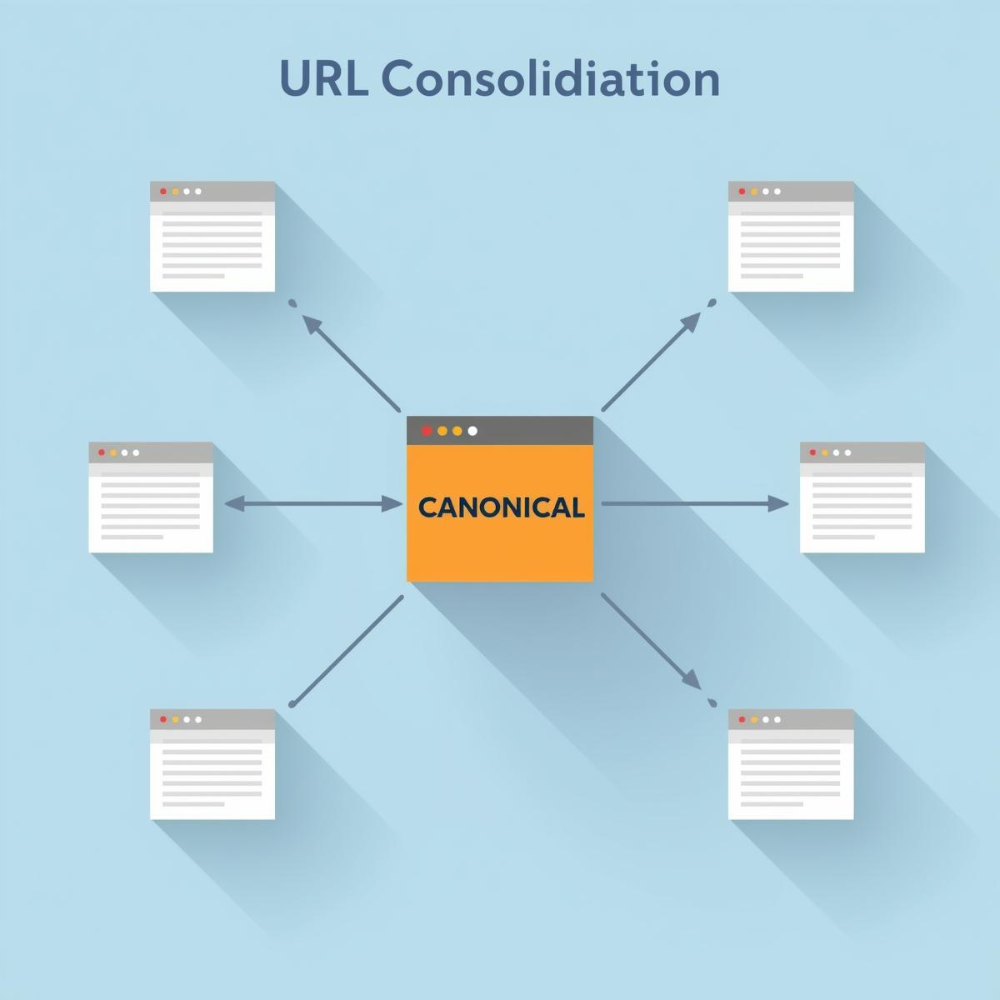
In the simplest terms, a canonical tag is an HTML element that tells search engines which version of a page should be considered the “original” or “preferred” version. You might be wondering why this is necessary. After all, websites often have multiple URLs that point to the same or very similar content. Without having a clear direction, search engines could get confused which leads to duplicate content issues. This tag helps to solve this problem by pointing search engines to the correct version of the URL.
Why does this matter? Search engines may interpret identical content on different URLs as duplicate content, which can dilute rankings performance and may even lead to penalties if the content is intentionally manipulative (like plagiarism). A canonical tag helps you avoid this by pointing search engines to the correct page to index and rank.
For example, imagine your website has multiple pages with similar content, like product descriptions or blog posts with different parameters (e.g., one with a category filter, another with a search query). Without this tag, Google might see these pages as duplicate content, which can hurt your site’s SEO. By implementing it, you tell Google which page to index and rank.
Pro Tip: Google’s official documentation on canonical tags explains how to implement them for maximum impact.
The SEO Impact of Canonical Tags
Prevent Duplicate Content Issues
One of the biggest challenges in SEO is dealing with duplicate content. When search engines encounter pages with nearly identical or identical content, they can struggle to determine which version is the most authoritative.
This is where the tag shines. It consolidates the SEO value of duplicate pages by indicating which page should be considered the main one. For instance, if you have multiple pages with similar content, applying this element to the primary page ensures that search engines focus on the right one, thereby preventing penalties associated with duplicate content.
Consolidating Link Equity
Link equity, or the value passed through links, is a critical ranking factor for SEO. When you have multiple pages with similar content, each page may accumulate inbound links, which could be spread across different versions of the content. Having multiple versions of a page can dilute link equity, making it harder for any one page to gain enough authority to rank well.
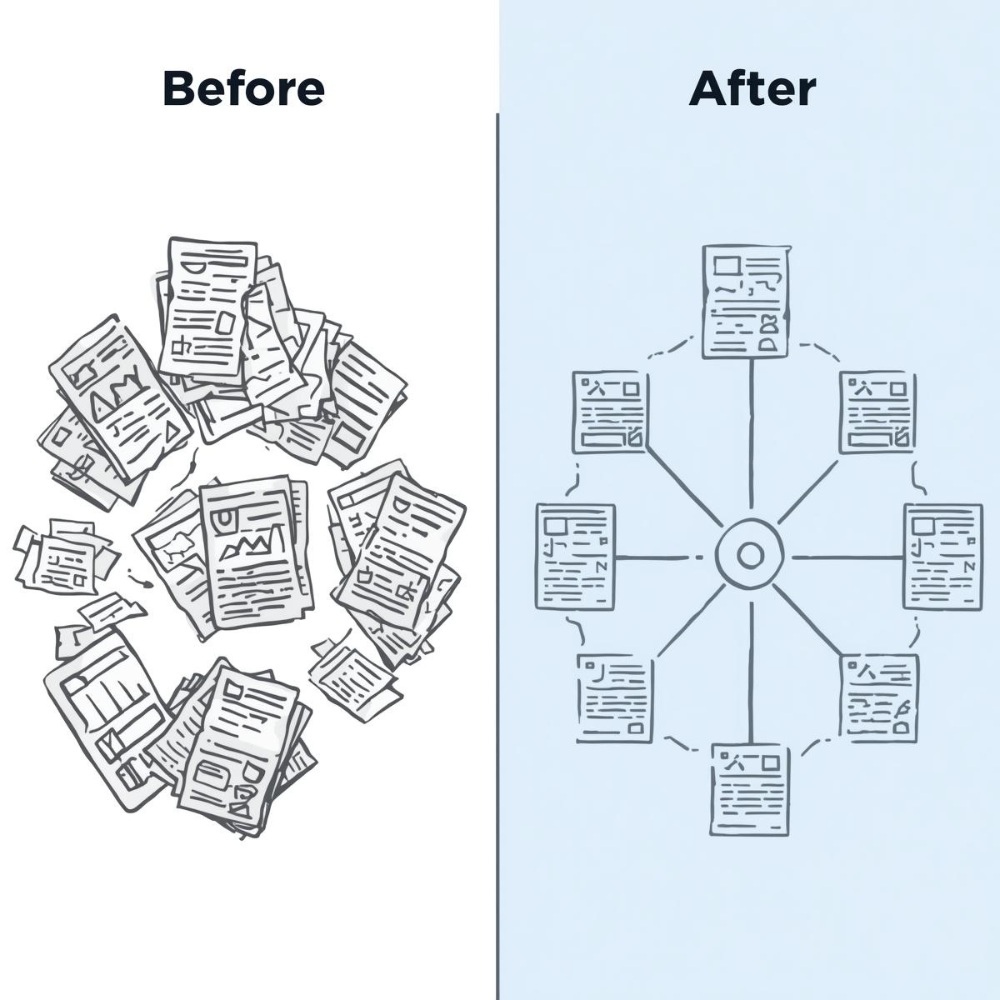
By using this feature, you consolidate all of these link signals into a single URL. This means all the backlinks pointing to similar content are directed to the preferred page, allowing it to build stronger authority and improve its chances of ranking higher in search results.
Improving Crawl Efficiency
Search engines like Googlebot have limited crawl budgets for each website. This means they can only visit a certain number of pages within a specific time frame. When search engines encounter multiple versions of the same content, they waste valuable resources crawling these duplicate pages, which could be better spent crawling unique, valuable content.
A canonical element helps search engines prioritise the right pages, improving their crawl efficiency. By ensuring that search engines focus on the primary page rather than waste time on duplicates, you’re optimising the way Googlebot interacts with your site, ensuring that your most important pages are crawled more often and given more visibility.
How to Implement a Canonical Tag
Implementing this HTML tag on your website is relatively straightforward. Here’s a step-by-step guide:
Identify Duplicate Content: The first step is identifying which pages have duplicate or near-duplicate content. You can use tools like Google Search Console, Screaming Frog, or SEMrush to find such pages.
Choose the Primary Page: Once you’ve identified duplicates, decide which page will be the canonical version (Original page). This is usually the page you want to rank higher or the one with the most valuable content.
Use Absolute URLs and Consistent Trailing Slashes: When adding canonical tags, always use absolute URLs, including the full web address (e.g., https://example.com/page). Avoid relative URLs, as these can confuse search engines and lead to incorrect canonicalisation. Additionally, ensure consistency in how you handle trailing slashes. For example, if your site uses URLs with trailing slashes (e.g., https://example.com/page/), ensure the canonical tags reflect that format. Inconsistent use of trailing slashes can lead to duplicate content issues.
Add the Canonical Tag: In the <head> section of the HTML of the non-canonical pages, add the following code: <link rel=”canonical” href=”https://www.example.com/preferred-page” /> Replace the URL with the address of the primary page you want Google to index.
Test and Monitor: After implementing the tag, monitor the performance of your pages through Google Search Console to ensure that the correct page is being indexed and ranked.
Common Mistakes to Avoid
Overusing Canonical Tags
While these tags are useful for consolidating content, they shouldn’t be used excessively. Overusing them or applying them to pages that don’t need them can lead to complications in your SEO strategy. For instance, if you use them on pages with unique content, you might inadvertently tell Google to ignore valuable pages, which could harm your SEO efforts.
Incorrect Canonical Tags
Another common mistake is using incorrect or broken canonical links. If you point this tag to the wrong URL, search engines may start prioritising the wrong page. It’s important to ensure that the canonical URL is the right one and that it leads to a fully accessible and relevant page.
Forgetting to Update Canonical Tags
If you make changes to your website’s structure or URLs, you need to update your canonical indicators accordingly. Forgetting to update the tag after a URL change can confuse search engines and hinder your site’s SEO performance.
Real-World Applications of Canonical Tags
For E-commerce Websites
For e-commerce websites, canonical tags are especially important due to product variations. Often, a single product might have multiple pages with different filters or sorting options. In these cases, a canonical tag points to the main product page, consolidating the link equity and preventing duplicate content issues for each variation.
For Blogs and Content-heavy Websites
Blogs and websites with large amounts of content can also benefit from canonical tags. For instance, if you have similar articles on a topic with slight variations or duplicate content across different URLs, applying canonical elements ensures that Google indexes the right version and boosts its ranking.
Frequently Asked Questions
What if I have multiple canonical tags on one page?
Having multiple canonical tags on the same page is a mistake. It confuses search engines, and they may ignore the tags altogether. Always ensure that only one canonical tag is applied to each page.
Should I use canonical tags for content with slight variations or across different domains?
Yes, canonical links should be used in cases of slight variations. For example, if you have a content syndication on another domain or a slightly modified version of a page, the canonical tag can point to the primary version of the content.
Can a canonical tag help with ranking issues or penalties?
While these tags help resolve duplicate content issues, they are not a direct solution for ranking penalties. However, properly using canonical links can improve your site’s overall SEO by consolidating link equity and ensuring the correct version of your content is ranked.
How do canonical tags interact with hreflang tags?
Canonical and hreflang tags should always work together. For instance, if you have a French version of a page (example.com/fr/page) and an English version (example.com/en/page), each hreflang tag must point to the canonical version within its language set. Failing to do so may cause search engines to index the wrong version.
How do canonical tags differ from redirects?
A referencing canonical is a directive for search engines, not users. It tells search engines which version of a page to prioritise but does not redirect visitors. In contrast, a 301 redirect permanently forwards both users and search engines to a different URL, often removing the original page from the index.
The Final Thoughts…
Canonical tags are an essential tool for any SEO strategy. By preventing duplicate content issues, consolidating link equity, and improving crawl efficiency, they help ensure that search engines prioritise the right pages on your website. Whether you’re running an e-commerce site with many product variations or a blog with content-heavy pages, implementing these elements will have a significant impact on your SEO performance.
At Seek Marketing Partners, we specialise in technical SEO solutions that make complex strategies simple and effective for businesses like yours. This article is part of our commitment to sharing knowledge and empowering businesses to succeed online. If you’d like professional support, our team is ready to help you optimise your site and achieve better search rankings.
Contact us today, and let’s make your SEO work smarter, not harder.