When running paid search campaigns, the difference between wasted budget and strong ROI often comes down to the keywords you choose. While targeting the right terms is essential, knowing which keywords to exclude is just as important. These are known as negative keywords, and when used effectively, they can significantly improve your ad relevance, click-through rates (CTR), and conversion rates.
In this guide, we’ll explain what negative keywords are, how they work, why they matter, and practical ways to implement them in your campaigns. By the end, you’ll understand how to fine-tune your Google Ads strategy to attract the right audience while saving money.
What Are Negative Keywords?
Simply put, negative keywords are words or phrases you add to your paid advertising campaigns to prevent your ads from appearing for irrelevant searches. By filtering out these search terms, you ensure your ads reach users with the highest potential to convert, while reducing wasted clicks that cost money without driving results.
Think of it this way: if you sell premium running shoes, you wouldn’t want your ads to appear for searches like “cheap shoes” or “high heels.” Adding these terms as excluded keywords prevents your ads from showing to users who aren’t your target audience.
| So, what are negative keywords? In practice, these keywords are a powerful way to refine your targeting. They allow advertisers to focus on high-intent searchers, improve CTR, and maximise the return on ad spend (ROAS). |
Benefits of Using Negative Keywords
Adding blocking keywords to your campaigns offers multiple advantages:
- Increase ad relevance – Ensures that your ads only appear for queries aligned with your offerings.
- Improve CTR – By avoiding irrelevant searches, the proportion of users clicking your ad increases.
- Save money – Prevents spending on clicks unlikely to convert.
- Boost conversions – Attracts users more likely to complete a desired action.
- Optimise ROAS – Focus your budget on the most profitable audience.
In short, negative keywords not only prevent wasted ad spend but also help shape campaigns that speak directly to your ideal customer.
Ready to take your PPC campaigns to the next level? Explore our tailored Pay-Per-Click services to optimise your ad spend and drive better results.
Types of Negative Keyword Match
These keywords can be applied in different ways depending on the scope and level of control you want. Google Ads allows three main match types:
Broad Match
Negative broad match prevents your ads from showing for searches that include all terms in any order. For example, if your negative broad match keyword is “running shoes”, your ad may still appear for searches like “blue tennis shoes,” but not for “shoes running” or “running shoes sale.”
Broad match can limit reach more than phrase or exact matches, so it’s important to use it carefully.
Phrase Match
Negative phrase match blocks ads from appearing for searches that contain the exact phrase in the specified order, even with additional words before or after. For instance, if your negative phrase match keyword is “full body massage”, your ad won’t appear for searches like “deep tissue full body massage,” but could still show for “shoulder massage.”
Phrase match offers a balance between control and reach, making it one of the safest options for many advertisers.
Exact Match
Negative exact match ensures your ad is excluded only when the search exactly matches the keyword phrase, with no variations. For example, [winter holidays] would prevent your ad from showing solely for users searching “winter holidays,” but not for “best winter holidays” or “holiday winter.”
Exact match is highly precise but can be restrictive, so it works best for specific terms or competitor names.
Looking to boost your online presence and drive more relevant traffic? Explore our comprehensive Search Engine Optimisation services to ensure your campaigns reach the right audience and deliver real results.
Account, Campaign, and Ad Group Levels
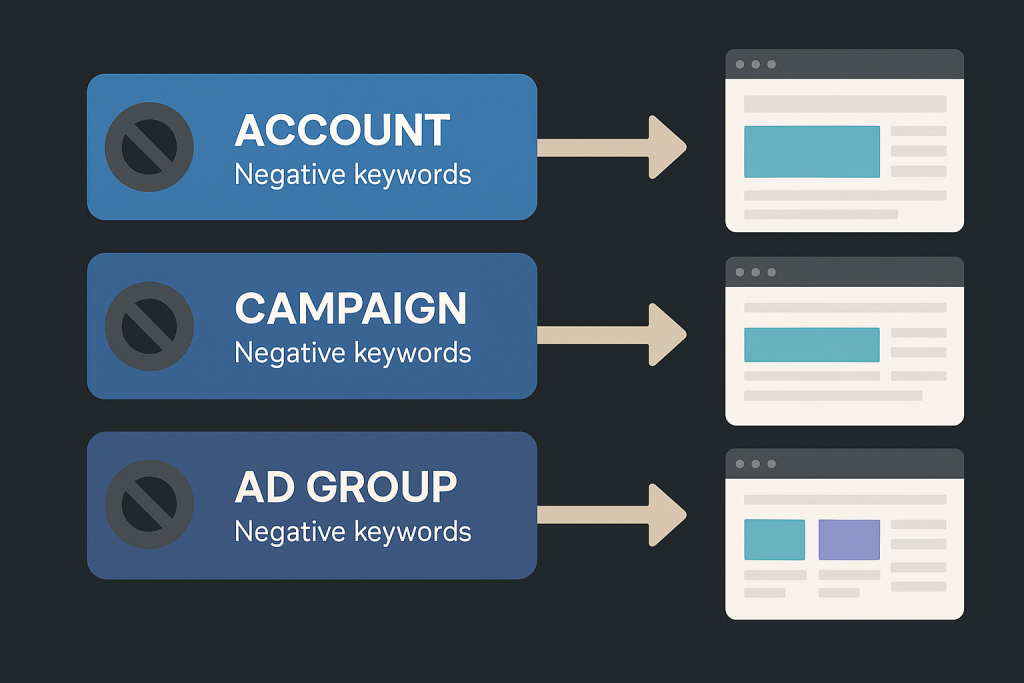
Negative keywords can be applied at three levels in Google Ads:
- Account-Level – Applies to all campaigns. Use this for generic terms you never want to trigger any ad across your account.
- Campaign-Level – Applies to all ads within a specific campaign. Ideal for excluding broader terms irrelevant to a campaign’s focus.
- Ad Group-Level – Applies to a specific ad group. Useful for finer control, e.g., excluding “formal” for a running shoe ad group but allowing it for dress shoe ads.
Choosing the right level ensures you avoid blocking valuable traffic while maintaining relevance in your campaigns.
How to Find Negative Keywords
Identifying the right excluded keywords is critical. There are several methods to do this effectively:
Keyword Research
Start by understanding your target audience and the search terms they use. Look for terms that are similar to your product but don’t align with your business. For example, if you sell premium shoes, terms like “cheap shoes” or “second-hand shoes” can be added.
Competitor Analysis
Review what keywords competitors are bidding on, especially if they’re unrelated to your audience. Tools like Semrush can provide insights into competitor PPC campaigns, helping you uncover terms to exclude.
Google Search & Autocomplete
Perform manual searches using your primary keywords. Observe autocomplete suggestions and related searches that may not match your campaign goals. Terms like “discount” or “free” often indicate low-intent queries.
Search Terms Report
Google Ads’ Search Terms Report shows which queries triggered your ads. Identify low-performing terms with low CTR or conversions and add them to your list. This method ensures your ads aren’t served to uninterested users.
Creating Negative Keyword Lists
Managing negative keywords at scale is easier by creating lists. Here’s how:
- Go to Google Ads and navigate to Negative Keyword Lists in the Shared Library.
- Click the plus icon to create a new list.
- Add the keywords, specifying match types (broad, phrase, exact).
- Apply the list to campaigns or ad groups.
Lists are particularly useful when running multiple campaigns with overlapping terms. For example, if you sell only new cars, a single list excluding “used cars” can be applied across all campaigns.Ready to optimise your PPC campaigns and drive better results? Our expert Google Ads management service can help you create and manage effective strategies tailored to your business goals.
Example of Negative Keywords in Action
|
Best Practices for Negative Keywords
To make the most of your negative matching strategy, include singular and plural forms (e.g., “shoe” and “shoes”), use symbols carefully as Google recognises ampersands, accents, and certain characters but handles them differently, and experiment with match types – broad, phrase, and exact can be combined to suit campaign goals.
Regularly monitor performance by reviewing CTR, conversions, and search terms to identify new negatives, and update lists frequently since PPC campaigns evolve, meaning your keyword lists should too.
Supercharge Your Ads Today
Incorporating negative keywords into your Google Ads campaigns is essential for saving budget, improving ad relevance, and driving higher conversions. By carefully selecting the right exclusions, using match types strategically, and applying these keywords at the appropriate account, campaign, or ad group level, you can ensure your ads reach the most relevant audience.
With this approach, your campaigns will become more efficient, your CTR and conversion rates will improve, and your return on ad spend will increase. Take the time to identify, test, and refine negative keywords, and your paid search campaigns will reward you with stronger performance and better results.